Showing posts with label blended learning. Show all posts

Tuesday, August 11, 2026

My Recent Intersections with the University of Louisville

The University of Louisville has always held a special place in my life.  In my youth (and currently as an adult!), I rooted for the Cardinals in sports.  My wife and I were married on campus at its Rauch Planetarium in 2003.   (Sadly, the university's plan for the planetarium -- not open since the pandemic -- is to remain permanently closed.)  It was at U of L where I earned my Bachelors (2005) and Masters (2007) degrees and began my teaching career through its Alternate Certification program.  

This year, I've had three intersections with U of L that I wanted to share.

In spring 2025, I taught my first online, asynchronous, graduate-level course for U of L.  At the end of last year, the College of Education and Human Development reached out.  A series of blended learning classes had been shuttered when the original instructor retired.  CEHD leadership asked: Would I be willing to teach additional courses, in order to revive the blended learning track?  I enthusiastically said yes.   The fourth and final course of my current commitment begins next week, and I'm thankful to give back to my alma mater as well as help future and early career educators!   I plan to begin the cycle again in 2027, so if you're interested in enrolling (you can still try to register for the upcoming fall term!), here are the titles of my online classes:

  • EDAP 688 Designing a Technology Integrated Curriculum (last taught spring term 2026)
  • EDAP 585 Digital Methods for Teachers to Design and Deliver Instruction (last taught summer term 2026) 
  • EDAP 587 Digital Methods for Students to Demonstrate Learning (last taught summer term 2026)
  • EDAP 690 Teaching with AI (begins August 17, 2026)

When I was a U of L student, I always enjoyed the Ekstrom Library as a place for study, collaboration, and research.  When I was recently on campus, I discovered to my delight that my book was part of its third floor collection!  

Bookshelf with a stack of books at Ekstrom Library, with my book in the middle of the shelf.


My book, held by my hand showing the spine, in front of a bookshelf at Ekstrom Library.


When I looked up the book's entry in Ekstrom's database,  I also found out that Tabletop Role-Playing Games in the Classroom is located at several other university libraries, including Vanderbilt, University of Illinois (Urbana-Champaign), University of Mary Washington, SUNY Geneseo, University of Southern Maine, University of Nevada (Las Vegas), Loyola Marymount, The King's University (Edmonton, CN) and the University of Saskatchewan.  I'm humbled that my book sits on so many shelves.

My book leads to my last University of Louisville connection.   For its recent Spring and Summer issue of U of L Magazine, I was featured in a two page spread!  The photo shoot was particularly fun -- members of the magazine staff came to our OVEC Middletown office, and in one of the setups, I lay on a table surrounded by my personal TTRPG materials as a photographer stood above and over me and took the picture.

U of L Magazine on the hardwood floor, open to the two page spread of my feature article.


Special thanks to Audrie Lamb and the rest of the U of L Magazine staff for the feature article!  

As I wrap up this entry, I want to share a heartfelt moment of my gratitude to many people -- some of which I haven't met, but left replies on my social media -- for showing their love my way.  I mentioned at the beginning that my wedding was held on the U of L campus.  The person I married was April Lynn Watson, another Cardinal graduate.   April was a beautiful, beloved, brilliant wife and my best friend.  I talked about her original battle with cancer here in my blog in 2019.  Tragically, the cancer came back after several years of remission, and April passed away on July 1.   Writing her obituary and eulogy was incredibly hard, but I was honored and privileged to share how wonderful she was to me and so many others.   Thank you to every single person who has expressed their condolences.  I will repeat what I said in a LinkedIn post: "It seems strange to breathe without [April], much less eat, laugh, or post online about work or writing accomplishments. I ask for two things. Firstly, your warm thoughts and support for myself and my family in the painful journey ahead. Secondly, for your grace and understanding as I post in the days and weeks to come. I know April wanted me to thrive, not just subsist, even as I now struggle in the tilted frame of my new 'normal.' I hope to continue to use my social media voice to uplift the topics I love: education, technology, game-based learning. Doing so helps me live, and endure, and honor April's life by trying to make a difference in others."

April and I sitting in the seats of the Rauch Planetarium, for our wedding in 2003.

April and I standing in front of the screen of the Rauch Planetarium, for our wedding in 2003.


Sunday, May 10, 2026

Markify

Several months ago, I came across the free browser-based tool Markify.   Based on the times that I've tried it out with others in professional development sessions, and the feedback I've heard from teachers who have used it, I've been impressed enough to want to share it in a blog entry!

How does it work?

You can sign up with an email and password, or SSO with Google or Microsoft.  Once logged into your "Dashboard," you can sort through previous "Lessons" (recently used, shared by others, owned by you, or newest created) or start a brand new Lesson with a Board.  It can just be a blank page (set at various sizes, portrait or landscape), but you can also "Freeboard" ("create an unlimited canvas for whiteboarding") or upload a PDF.  


A screenshot of your Board options: Blank Page, Freeboard, or Upload PDF.

Once the Lesson is launched, you can (re)name the file in the upper left, use the annotation tools with the toolbar along the left side, or share it out in the upper right.

Screenshot of Markify's interface and tools.

Let's start with the toolbar.  You have all of the usual suspects:
  • "Selection," where you can select specific annotations,  or use the pan option to"grab" the board to move around in the canvas, or multi-select objects.
  • "Draw," where you can change the color,  thickness, and opacity.
  • "Markup," where you can underline or highlight text or graphics (again, you can change color, thickness or opacity).
  • Erase
  • "Text Box," which offers both rich text and equation options.
  • Shapes
  • "Stickies" to create sticky notes with customization of color, text, inserting hyperlinks, etc., "watermarked" with your name in the lower right.
  • "Comments" to insert feedback or an observation, which also indicates who made the comment.
  • "Page," where you can insert something onto the space that can be made small or big.  Think of this as a simple "Board within a Board," where you can (for example) bring in another PDF and provide another place or thing to annotate upon.
  • "Media," where you can embed a YouTube video or upload an image.
You can also create multiple whiteboard pages within your space.

Of course, annotation by yourself can get lonely!  That's where sharing comes into play.  You can launch a Lesson and allow others to instantly join without them needing to create accounts.  (They are asked to give their name when they join.  This is where expectations and norms come in -- of course students may give goofy names or even be asked to do so to remain anonymous, but if you don't have real names, you can't give real credit for contributions.)  Also, Markify is device agnostic; someone can join from the mobile browser of their phone just as easily as the browser of their Chromebook.

A screenshot of the different ways you can share on Markify:  "Present with Pin," "Share with Link," or "Invite with Email."

Note that for all the various ways collaborators can join, by default all of these are "view only."  They will see whatever annotations are being made in real time.  However, at some point, you may want others to join in on the fun, and that's where Markify really shines as an innovative tool.

As the person who launched the Lesson, you have total control of who and how many can annotate, and for how long.  You can grant someone annotation permission but also revoke it at any time, and whether you have just one or a dozen or thirty friends with editing rights is up to you.  There's even a way to toggle off certain annotation tools so they cannot be used (by default, all are available for participants). 

From the student's interface, their options are initially limited.  They can move around the Board with the select or pan tool, possibly copy text or a hyperlink -- and that's it.  However, you can choose to give editing rights to any "Viewer," or recognize when a student "raises their hand" to participate.

Screenshot from a student's perspective.
Taken from an Android phone. Note the "raise hand" icon at the top of their toolbar; students can request editing permissions, but can also "lower their hand."


From the teacher's perspective, you can give a student (or students) editing rights, lower their hand, observe just their movements within the Lesson (even if it's just clicking or panning), or remove them from the session.  Markify will indicate if students are idle, or viewing something else in another app/tab.

A screemshot showing "Jimmy Page" raising his "hand" to join, and the various options a teacher has (allow editing, lower their hand, observe their interaction on the Board, or remove from the session).


At the end of a session (or at anytime), you have other options by clicking "File" in the upper left, next to your Lesson's name.   From here, you have options like exporting to a PDF (each page separately, or everything as a single page, or selected elements), print, or even see a "timeline history" of each participant's contribution.

Screenshot of the various "File" options with a Lesson, including exporting or seeing the timeline history.


The newest feature is Breakout, where you can "allow for lessons to be 'broken out' into individual or team work." (There are limited sign ups within Markify for early access; this seems poised to be a premium feature once it's publicly released.) You will create a Lesson as normal, which will become the "base document" replicated for each group.  You then can use "AutoPair to put members into teams randomly (or groups of one), Team Up to allow members to pick their team, or manual to setup teams yourself."  You can monitor each group while they work, and even see a "percentage of work" indicator for each group member in order to determine the proportion of each student's contributions.

A brief overview video (1:26) of Markify is here:


How could you use it?

Markify is a great way to monitor and manage digital collaboration.   Consider the chaos of creating a typical Google Doc and making the link editable by everyone, then having thirty students suddenly clicking and typing simultaneously.  With Markify's granular permission system, you can make contributions become a flood or a trickle.  While Breakouts may be a premium feature, it shows yet another way to have students work together that can be tracked and assessed and somewhat private, without worrying about a student typing "the teacher is an dweeb" for the entire room to see. (And remember: you can choose to toggle off certain tools like text box and comment.)

By starting a session, you can either project the teacher view at the front of the room, or students can follow along in real time on the screens of their individual devices.  As a direct instruction move, you could then model ways to annotate text before allowing them to do the same (perhaps even with hard copy of a text and old fashioned highlighters and pencils!).  Or, after having a clear conversation about expectations and norms, have a classroom "conversation" in real-time using Markify as the common space to "talk" through the analysis of text or a graphic. 

Downsides?

It's hard to quibble with a free tool that allows for such meaningful collaborations.  It might be nice to have an option of importing an image or YouTube video from the start of a Lesson (right now, the only file choice is a PDF), but of course you can easily upload numerous media once the Lesson is created.

Thanks to Markify showing us that there are still some new, free digital tools we can try out in the classroom!

Have you tried Markify, or have a similar app to recommend?  Make a Comment below!


Thursday, September 12, 2024

A New Role at OVEC

Back in late August 2022 -- in what seems just an eyeblink ago -- I joined the Ohio Valley Educational Cooperative (OVEC) as part of the grant-funded "Deeper Learning Team."  It's been a journey full of opportunities for learning, partnerships on innovative projects, and celebrations of the innovative teaching in the Bluegrass.  Alas, the grant ends on September 30, 2024, and with it, my Deeper Learning Design Specialist position.

But I am incredibly fortunate that our CEO Jason Adkins, along with OVEC's Board, saw the value of the work many of my grant-funded colleagues achieved, and found it in their budget to create several new positions.  So I'm very pleased to share that on the first of October, I will become OVEC's Digital Learning Consultant!

I strongly believe in OVEC's mission of "empowering educators so students thrive," and have grown to know many amazing colleagues.  To be able to work here is a joy and a privilege.  Besides continuing to be a thought partner and facilitate professional development, I am also thankful to still share the stories of innovative educators of our area, through this blog and my social media.  

I'll end the entry with a link to my newly launched OVEC Digital Learning Consultant website.  (It's also reachable via its shortcut ovec.org/digitallearning.)  If you're looking to schedule a conversation on how I can support you, or register for the latest PDs I'm leading, please give it a visit!   


Saturday, July 13, 2024

Snorkl

As a former high school English teacher, I always felt pressured to provide useful, personalized feedback quickly.  Digital tools like the Comment feature in Google Docs became popular just as I was leaving the classroom, and certainly shifted the paradigm when it came to giving "just in time" quality feedback.

Now, thanks to artificial intelligence, we are on the precipice of the next generation of digital feedback that can transform teaching.   For some time now, genAI chatbots like ChatGPT already offer an augmented opportunity to comment on student writing -- if you are willing to engineer a prompt for what you are looking for, then copying and pasting each student essay into the tool, then copying and pasting any AI feedback you wished to share back with a student.  (You can even include your rubric in your prompt, so you can get your feedback with a suggested assessment score.)  This is free and helpful, albeit time consuming and clunky.

But now we enter what I am calling the "refurbished" phase of AI.  In these newest AI tools, the programming is more hidden under the hood, while the interface is much more user friendly and less dependent on prompt engineering.  And that leads us to the tool for today's entry: Snorkl.  While its strength in providing feedback for solving math problems seems obvious, its potential for analyzing reflection and metacognition in multiple content areas is also apparent.

How does it work?

You can sign up free with a Google or Microsoft account.  Snorkl will ask you whether you are a teacher or a student -- I'm not sure how easy it is to change this if you answer wrongly, or are wanting to see what the other side is like before trying to return to your standard role, so choose wisely.

Your home page is intuitively organized with several options.  A "Getting Started" box provides light tutorials for how Snorkl works. Some videos to watch are in "Resources."  You can explore premium plans; although a free account gives you unlimited classes and co-teachers, you have "limited" activities -- an actual number is not specified.  Last but not least, you can create a class where you can then make activities for students (a share link for your activities makes it easy to get students jumping in).

Your Home tab.  Note the tabs across the top for Classes and Library (see below).

What does Snorkl feel like for a student? In the pre-made "Try as a student!" section, several prompts are given so you can experience Snorkl for yourself, and reveal its potential for a wide range of content.  For example, there's one for "Trig Ratios," and another that asks you to "Identify the author's feelings about New Orleans in this 4th grade ELA assignment."  I was intrigued by the "Peanut Butter & Jelly Sandwich" activity -- a classic writing prompt I used years ago with students to show the importance of details when describing "how to" instructions -- so that's the one I chose.

When I opened it up, I first encountered the "Response Whiteboard."  

The activity's instructions are in the upper right, which can also be read aloud to the student.

As you can see from the toolbar at the top of the whiteboard, there are several buttons that allow you to insert text, pictures, and formulas for your response; while you can use the mouse/trackpad to draw, it's probably not as natural as using your finger or stylus on a touchscreen device. (This is the same whiteboard interface the teacher uses when creating the activity prompt for students.)  However, "Record Screen + Voice" is where the real magic of Snorkl resides.  While you can write or draw to your heart's delight before hitting this button, you really can't submit your response unless you make a recording.  That's because Snorkl takes what you say and converts it to text for the next step of the process. Of course, like any screencast, you could draw and type as you talk.  (The first time you do this, you'll be prompted to give permission for Snorkl to use your microphone.)

Once you submit your response, Snorkl uses AI to, in effect, analyze your thinking out loud and tell you how well you did.  The first time I responded I didn't doodle and simply talked through how to make a PB&J.  After several seconds, I got back this screen:

The comments on the right are timestamped; click on the time and you can go straight to that part of the recording.

I have to admit, this had me pretty slack-jawed.  You can play back your recording, with a running transcript in the form of captions.  Snorkl provided some simple overall feedback ("Correct," "3/4 Strong") followed by impressively detailed commentary.  Even the tone seemed appropriate -- Snorkl celebrated my strengths ("Great job on giving a detailed explanation...I love how you even included the part about opening the bread bag") while also providing me ways to improve ("Have you tried using the same knife for both the peanut butter and jelly?").

If you like, you can do another response, with either a clean whiteboard or pick up where you left off.  These additional responses become a history that you can revisit and review, to see your growth over time.

The Portfolio tab shows how Snorkl can be a place for artifacts for learning; for example, imagine a student pulling out a response during a student-led conference with their parents. 


Of course, teachers can review and play the videos of these submitted responses.  Once several responses have been submitted, Snorkl's website suggests that a teacher will be able to see some class-level insights, such as "top exemplars" and "common misconceptions," but it is also possible such insights are only fully available as a premium feature. 


Snorkl calls itself "a versatile tool for all subjects, used from elementary through college."  As an additional nod beyond the "try as a student" examples indicated above, the platform also provides some pre-made activities in several content areas and grade levels in its Library.


The library bank already covers many grade levels, with more "coming soon."


Finally, for a video on getting started with Snorkl, watch the following (3:24):


How could you use it?

Students could be assigned a Snorkl task:

  • as a more interactive type of "flipped learning" homework
  • during class as part of a blended learning station rotation
  • at the end of class as a formative assessment exit slip to determine if they understood today's content (and give the teacher data on what misconceptions to address for tomorrow's class)

Downsides?

Snorkl offers some powerful features for free, so it is hard to find faults with the tool itself beyond just how many activities you can create at no cost, or the possible limitation of the drawing features if you don't have a touchscreen device.  From a teacher's perspective, it truly can become a powerful "instructional aide" (not teacher replacer!) in your classroom.  A more likely negative is about the potential for a teacher to overuse the tool, or use it without also checking student work in person.  As always with edtech -- especially with AI -- practice moderation, oversight (it's not always right), and balance.

Have you used Snorkl, or a similar AI tool?  Share your stories in the Comments below!


Wednesday, December 21, 2022

How AI Will Save Education

A decade ago, I was a high school English teacher blissfully naive to what radical changes were coming thanks to edtech.  How innocent the days of 2012 seem now, when a teacher only had to worry about the ways Google Search posed a threat to cheating on multiple choice assessments (which began my questioning of the value of assessing regurgitated facts in the first place), or how I had to participate in the ever escalating "arms race" of combating students stealing online essays and quoting other people's words without citation by deploying the latest upgraded anti-plagiarism programs. 

Recently I wrote "What If Your Co-Teacher is a Computer?"  While I mainly addressed taking classic co-teaching strategies and applying them to scenarios that integrated in-person teaching with an online course or adaptive learning platform, I intentionally titled the blog entry with my tongue firmly in cheek, implying a day when a human would seriously have to wrangle with how best to work with an artificial intelligence (AI) educational partner.   I imagined such a day was far, far into the future.  

That was back in October.  But like a Christmas miracle a few months later, ChatGPT exploded into our zeitgeist seemingly out of nowhere, and it feels like something foundational has rapidly and irreversibly shifted in education...indeed, the world.

It should be noted, however, that ChatGPT did not arrive on the scene in one fell swoop, and is merely the steady evolution of AI over the last several years.  Consider the following developments in artificial intelligence:

  • In 2016, the Associated Press began outsourcing its minor-league baseball dispatches to a company called Automated Insights.  By merely taking boxscore data, the company's AI can write simple stories about the key facts of the game, which are then published in newspapers and websites nationally.  AP has expanded its use of Automated Insights into other sport dispatches, quarterly business financial reports, and more.*
  • In February 2019, an IBM AI supercomputer named "Project Debater" was pitted in a competition against a human national debate champion Harish Natarajan.  A journalist was impressed not just at Debater's ability to speak, but to listen: "It sort of took [the audience's] breath away to see that the computer, in its rebuttal, had actually listened to some of what Hari had said, digested it, and was formatting a response in real time to it...I think there was a sense from the audience that there was almost really a personality there."  While officials ultimately judged Harish the winner, the audience voted that Debater was more informative.**
  • While rough "deepfake" videos have been around for several years, the proliferation of video manipulation that appear real enough to fool viewers really shifted into high gear in 2019 with the launch of multiple AI open-source software and mobile apps.  (On a side note: I highly recommend sharing with students The Washington Post's website "The Fact-Checker's Guide to Manipulated Video"; this may require a free account to access.)
  • In 2021, as part of a project called "The Lost Tapes of the 27 Club," AI was used to create new music and lyrics in the stylings of several artists that died tragically young, such as Kurt Cobain, Jimi Hendrix, and Amy Winehouse.  Human soundalike vocalists were then utilized to actually record the compositions.  The organization behind these "new" songs, Over the Bridge, did the project to raise awareness of mental illness among musicians. 
  • In the last year, AI such as Midjourney and DALL-E that creates art based on user suggestions have soared in popularity while also raising the question of the ethics of such programs; for example, it has been discovered that some AI will find art already on the Internet to potentially blend into a new piece without proper attribution or compensation for the artists, or the more basic fear that artificial intelligence apps will do for free what you used to pay and commission artists to create.  

In this context, ChatGPT -- a free online program that, in essence, takes your prompts and questions in order to produce original writing -- can be seen as the natural next step for AI.  In some ways it's like a sophisticated search engine giving you a highly specialized, curated text (without, it should be noted, any citation of the primary sources or facts that led to such an answer).  It relies on the huge database of the Internet, and like much of AI, is learning how to be more effective every time we use it.  What fascinates and disturbs many people is not only the human-like style of ChatGPT's writing, but its ability to generate original and even artistic pieces. 

I thought I could easily stump ChatGPT.  But I was wrong.

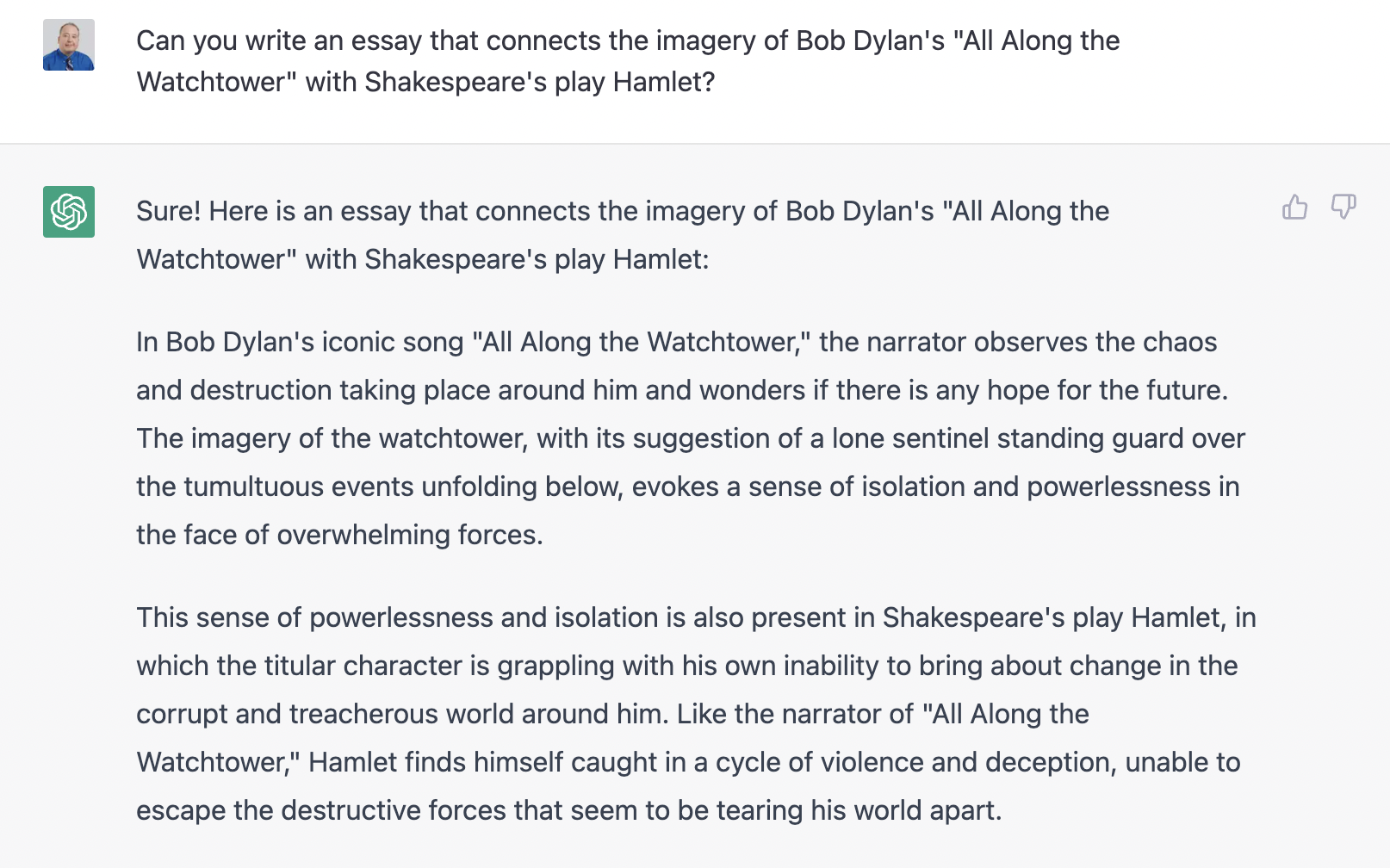
My wife wrote an essay back in high school where she compared Bob Dylan's "All Along the Watchtower" to Shakespeare's Hamlet.  A quick Google search resulted in no immediate hits of others writing such an essay.  Yet, when I gave the prompt to ChatGPT, I got the following within a few seconds:
An excerpt (about two-thirds) of ChatGPT's original essay.

Next, I asked it to write a 12 line poem about dachshunds and Jedi Knights.  While it ignored my directions and wrote four extra lines, I was shocked to get a poem that dutifully blended both subjects in non-rhyming, narratively consistent verse:


Not Shakespearean, and certainly missing some compelling imagery, but I would have considered it okay if one of my freshmen had submitted it.  Still, I'm nitpicking about something game-changing here: ChatGPT wrote an original poem in seconds.  Even more amazing, ChatGPT made some independent artistic choices.  I didn't tell it to make the doxie a Jedi Knight, but by deciding to do so, it created a sense of whimsy.  Can a robot be whimsical?

The last example I will share goes to the heart of instruction.   I had heard of teachers using ChatGPT to write a lesson plan.  This will be kludgy and awful, I thought.  Especially if I load up my prompt with detailed specifics.  The generation of the text took longer than the other two examples -- maybe an entire ten seconds -- but once again, I could not stump the bot.


Again, far from perfect, and ignoring some of what I asked for in my prompt, but I was pretty much astounded that AI could earn its keep as my instructional collaborator. (For the entire text of this example lesson plan, click here to view as a Google Doc.). 

The implications of all of this seems clear if not outright ominous: if an AI tool today can now write essays and poems, how must that change how we teach and assess student writing?  If a bot today can write a lesson plan, how does that change or even threaten the teacher's job in the future (in both the metaphysical and literal sense of the word "job")?

It should be no surprise that much of the reaction to ChatGPT is somewhere between existential dread and anxiety.  This has already resulted in some traditional "arms race" approaches, such as fighting potential student (mis)use of ChatGPT with a tool to determine the potential that a submitted text was created by AI.  But is this sidestepping a bigger question? Recently in The Atlantic, Isabel Fattal and Derek Thompson discussed our potentially "wild future."  If an AI can write a college essay, maybe we should re-evaluate the purpose of a formulaic college essay in the first place. As Thompson posits, "Some people argue that ChatGPT could replace the college essay, and Ian [Bogust, another staff writer] is saying: That’s only because the college essay is dumb to begin with. It’s possible that lots of things in the economy are dumb in the way that the college essay is dumb. If that’s true, then GPT can still be revolutionary. What it does might be dumb, but it’s also incredibly useful." An AI that can write a lesson plan might be better seen not as a threat to what an educator can create, but instead be an "inspiration stimulant" (Thompson's phrase) that serves to improve what a final lesson plan might be.  

Earlier this fall, Corey Mohn, President and Executive Director of CAPS Network, had recommended to our Deeper Learning Team a book that was just published in 2021 --- Running with Robots: The American High School's Third Century by Greg Toppo and Jim Tracy.  (Corey had me at "Greg Toppo," as I've been a fan of his since 2018 when I first read one of his earlier books.)  When ChatGPT hit the headlines, I binge read the book, as it seemed eerily prescient to the current hot topic question of AI's impact on education.  At this highly charged inflection moment, where the need for transforming school is critical, I could not more highly recommend this book.  It's a fascinating and engaging blend of four narrative strands: an American public education history from the 1800's to the present; the impact and ramifications of recent AI developments with predictions on what is to come; a spotlight on four high schools operating today which serve as models on how school can and should be; and last but not least, a novelistic Rip Van Winkle utopian story where a principal falls asleep in 2020 and wakes up twenty years later visiting his radically changed school. 


For Toppo and Tracy, future AI should not be seen as the bleak robotic replacement of teachers and humanity itself, but instead a challenge we must acknowledge and address: "As a society, we need a 'pre-AI moment' -- that is, a systemic anticipatory response on a scale commensurate with a previous generation's 'post-Sputnik moment.' And, like the response after the fact of Sputnik in the 1950s, this should transpire as much in the realm of educational as in policy initiatives" (190).  But our "systemic anticipatory response" must recognize why prior educational initiatives have failed in the past:
[D]ecades of failed revolutions, of the "next big thing," of teaching machines and expensive technical marvels, have failed to transform a hidebound, nearly intractable system.  Revolutionizing education is neither wise nor feasible.  Rather, we must evolutionize education, seeking to forge the optimal synthesis of the best and most germane from the received tradition with the most promising of emergent pedagogical practice.  After all, the received traditions have been honed over millennia and have much that is fine and still relevant, while new educational paradigms are often faddish and ill-considered.  The careful sifting and selection is essential. (37, authors' italics)

We don't have to throw the traditional pedagogical baby out completely with the "hidebound" bathwater, but we certainly have to evolve our educational practices in light of our near-future technology and needs.

Toppo and Tracy point out an illustrative example that involves math instruction. By the 1970's, pocket calculators became cheap and commonplace enough that an average student could easily own one.   Technology offered us a chance to be a partner. This should have been a watershed moment for instruction, when math teachers began focusing at least as much (if not more!) time on mathematical practices -- on authentic practical application, on conceptional knowledge, on experiencing the aesthetic beauty of mathematical thinking -- rather than having students spend their time mindlessly plugging and chugging through memorized but ill-understood formulas.  However, even a half century later with the latest smartphones and laptops and AI apps, we still spend a disproportionate amount of time asking students to compute like, and compete with, a computer instead of thinking math like a human and collaborating math solutions with humans.   As the authors' fictional future principal puts it, "We humans are still pretty unique in our ability to make creative connections across apparently disparate knowledge areas....That's the value of omnidisciplinary literacy. The time that is freed up by not bringing every student to content fluency can be devoted instead to imbuing them with process fluency" (16, my italics).   In other words, have students spend less time regurgitating facts that you can Google and on skills rapidly being augmented or replaced by AI, and instead spend more time learning the critical human applications that truly matter that can't be easily supplanted by a robot.***

The idea that AI can actually be the savior of educators, education, learners, and learning and not its destroyer really goes to the heart of our current Deeper Learning work.  We pose questions such as "How might we reimagine the student experience to become more meaningful, relevant, and inspiring so that every learner is equipped for a successful future?" We know the answer is not more regurgitation of facts, more formulaic writing, more solving of inauthentic scenarios of two trains running toward each other on the same track.   We cannot have students spend years learning the "hidebound" traditions of the so-called fundamentals before they get a chance to "play the whole game," to use Jal Mehta's excellent Little League analogy.  We need more lessons that emphasize Profile of a Graduate competencies that lead to application of durable skills, which will likely be the last bastion of uniquely human cognition left in the decades to come.  If we hesitate to transform teaching now, AI may truly become humanity's rival instead of our partner in the future.

To take us back to our present ChatGPT dilemma for student writing, I offer three possibilities for teachers.

  • Lean into ChatGPT as an opportunity for a student to generate a first draft, provided the understanding is that the student revises that draft to further enrich and enlarge her/his thinking with additional detail and complexity.  The student should also do "reverse engineering research" to find, validate, and cite any facts or quotes given in ChatGPT's text. As a student requires feedback and shows examples of their subsequent drafts,  the student is responsible for being transparent about their writing process and is asked to reflect on how the paper evolved from ChatGPT's initial text to their own final product.
  • Create "mini-dissertation defense" opportunities where students must orally explain their writing to the teacher and/or peers.  A student that can metacognitively talk through their thinking is a person who can demonstrate how they, and not a computer, have demonstrated mastery.  Pose questions and inquiries like, "Where are you personally connected in the work?" or "Explain your use of metaphor here."  Of course, such oral opportunities also provide practice and proof of those Profile of a Graduate competencies such as effective communication. 
  • "Where's the epiphany?" If the expectation of the writing is to simply synthesize known facts into a narrative, tools like ChatGPT will continue to put the human 3.5 essay out of business.  Let's instead make the expectation of the writing be the creation of a new insight or invention, instead of a regurgitation of bullet points.  Consider ways to refine what your writing is asking for, such as the performance assessment criteria tool in my blog entry "From Good to Great, Initial to Ideal: A Way to Improve Exhibitions and Other Performance Assessments."

I'll end with a rallying cry from Toppo and Tracy:
So, if we want to help our young people thrive in a world of miraculous technology, we must forget the nouns -- the AI and robots and intelligence systems -- for these will always be changing.  We must focus instead on the verbs: What it is we trust our young people to do that we don't trust technology to do?  And how can we prepare them for this future?   
For starters, let's not give them robots' work.  Let's trust them to do better, harder, more rigorous, more interdisciplinary, high-stakes work -- and not just for the 10 percent, but for everyone.  We must expect more of young people, not only because the world will expect it of them but because they are begging us to do so. (70)
Let's teach our students to run with the robots, and not against them.


Some footnotes:
  
* Toppo and Tracy, pages 82-83.

** Toppo and Tracy, pages 201-203.

*** "For so many students, school is simply not demanding enough - and the dilemma, of course, doesn't begin in high school. When the Education Trust, a civil rights group that advocates for low-income and minority students, examined more than 1,800 math assignments given to middle school students in six urban, suburban, and rural school districts in 2018, it found that most of the assignments featured 'low cognitive demand,' overemphasized procedural skills and fluency, and provided little opportunity for students to communicate their mathematical thinking.  The problem was often worse in high-poverty schools" (Toppo and Tracy, page 70).  

Saturday, October 15, 2022

What If Your Co-Teacher is a Computer?

I was speaking to a principal who had what at first sounded like a fairly unique problem of practice. The principal's students were in an alternative setting and the main delivery and assessment of content came from an online course platform.   The staff fully recognized the need to provide the students with a richer learning environment than simply watching videos that led to multiple choice quizzes and eventual unit tests.  However, attempting to insert in-person instruction and implement a hybrid solution created struggles. When teachers leaned in with mini-lessons or other activities, students were inevitably knocked "off pace" from their time away from the online course platform.  Additionally, some of the staff were not experienced teachers, so even deciding how or when to lean in was a problem.  All of this created a spiral of stress for both the educators and students.  How could they resolve this tension?

As I sat in the office, I had an epiphany.  The situation wasn't entirely unique.  At its core, solving the issue takes trying to achieve one of the toughest goals in education: effective co-teaching.   

Before continuing, a digression.   Likely seeing a lack of pragmatic support for co-teaching in teacher prep and in practice, Marilyn Friend and Lynne Cook wrote Interactions: Collaboration Skills for School Professionals, first published in 1991 and now in its ninth edition.  It's interesting to point out that the authors came from special education backgrounds, and for most classroom teachers, that is usually their co-teaching situation: a gen ed teacher is the one "in charge," while an ECE teacher pushes in because several children with IEP needs are on the roster.  Of course, the potential of two professional adults in the room to lead instruction often is unrealized, for reasons practical (lack of time to collaborate and plan together) and pedagogical (lack of training and practice on co-teaching structures).   One of the more enduring and cited aspects of Friend and Cook's work is how they framed the six models of co-teaching:

  • One Teach, One Observe
  • One Teach, One Assist
  • Parallel Teaching (students are split into two groups; teachers simultaneously teach the same content)
  • Station Teaching (students rotate through two or more "stations," with each teacher at a station teaching different content)
  • Alternative Teaching (one teacher teaches the main content to a main group, while the other teacher teaches different content to a smaller group for a specialized basis, such as academic gap recovery)
  • Team Teaching ("tag team teaching" where teachers both teach the whole class at the same time)
Sean Cassel, in his article "How to Choose a Co-Teaching Model" (Edutopia, 10/8/19), succinctly points out pros and cons for each model to consider.  For example, "One Teach, One Observe" could be a powerful strategy if the observing teacher was capturing learning evidence and taking detailed notes of all student moves, rich data that is analyzed by both teachers later.  It also requires little if any pre-planning time...which is why this co-teaching model (along with "one teach, one assist") is often chosen by pragmatic default.   However, lack of time ends up also being the weakness of both "One Teach, One Observe" and "One Teach, One Assist":  without instructional intentionality before a lesson, and without valuable debriefing after a lesson, there is little to show for the effort except an underutilized educator and a lack of student learning improvement beyond what one instructor could have achieved alone.   Besides these pros and cons, teachers may switch these models up based on the needs of the given instructional day, and of course the personalities and experience levels of the teachers will influence the effectiveness of their model choices as well.  (For more quick tips on effective co-teaching, I also recommend "Co-Teaching Strategies: Dos, Don'ts, and Do Betters" by Wendy Murawski and Toby Karten, ASCD, 7/1/20.)

All of this can be helpful when attempting to intentionally plan how to co-teach with another human. But what do you do if your co-teacher is a computer?

It first should be noted that relying on a computer to help your instruction is not a bad thing.  If I thought it was bad, I would have shut down Edtech Elixirs a long time ago!  The issue is effectively working alongside a platform that is delivering instruction and assessing students.  As I see it, such platforms fall on a spectrum, and for our purposes, can analogously be compared to in-the-flesh educators:

  • Platform as Specialist:   This is an adaptive learning platform (like Lexia Core5 or DreamBox) that teaches discrete skills, usually in response to pre-assessed learning gaps.  "Lessons" tend to be short and are much more experiential, often with a game-based learning angle; they also tend to be in shorter time increments (perhaps, say, twenty minutes, and completing 2-4 of such lessons a week is the average expectation).  Students are limited in both their ability to choose what lesson to take next (as the system decides their pathway) as well as their ability to see a sequence (as the lessons may address gaps across grade levels, as opposed to curricular "units").  The platform can also just "work" with little management from the teacher, although one hopes he/she looks at the data periodically to personalize future instruction!   While students may "level up" as they successfully complete lessons, there is no real individual assessment grades to report. These platforms are analogous to literacy/numeracy/ECE specialists that may push in or pull out for a handful of students, usually only one or two times a week, and by the nature of their work is not necessarily connected to the lesson of the day.   As such, they are the least intrusive and hardly factor into most teachers' general weekly planning of lessons, besides perhaps deliberately setting aside in-class time to get on the platforms. 
  • Platform as Instructional Aide:  This is a learning platform that has full lessons (likely driven by a video or screencast), organized in units and with at least self-check assessments that give some kind of grade to help determine how well the student is comprehending the material.  Alignment to academic standards is usually more prominent and obvious.  However, these platforms are very flexible and modular in nature, so a teacher can manage its integration into daily instruction as they see fit; for example, the teacher may use the platform for "flipped learning" on delivering certain content videos several times a week as "homework" while face-to-face time is used for practicing math problems.  An example of this kind of platform is Khan Academy. These platforms are analogous to an instructional aide that is significant to the classroom, may even be present daily, and might do some light instruction and formative assessment, but the "teacher of record" who is truly in charge of instruction and summative assessment is still clear. 
  • Platform as Teacher:  This is an online course platform where the system both delivers all of the content and can formatively and summatively assess student performance.  Such platforms, like Edgenuity and Apex Learning, could conceivably be done fully virtual even outside of a brick and mortar school, with little interaction from an educator unless the student needs tutoring help with content or to unlock a quiz or test.  Pacing is usually established by the platform, with either activity due dates or another metric, providing feedback for a student ("You are two lessons behind") to ensure they complete the course in a prescribed timeline.  Here, you can see how the situation is the inverse of the "Platform as Specialist":  with an online course platform, the human teacher often serves a backseat role. ** 
It is in this last category, Platform as Teacher, where we can circle back to the issue that began the entry.  If you are using an online course platform as the primary driver of instruction and assessment, all of the struggles you may have are exactly the same as one might have with a human co-teacher.  Therefore, you need to first determine what co-teaching model will work best for you.  Let's look at the models again adapted for this new "co-teacher is a computer" angle.

  • Platform Teaches, Educator Observes:  The online course platform is the full driver of instruction and assessment for all students (which also implies that only autoscored assessments are kept in the course).  However, the educator is constantly looking at two things.  First, the educator is analyzing the data behind the scenes.  How much are they logging on?  Is the student barely passing the quizzes or taking too many attempts?  Does the student make notes in Google Docs that can be shared and seen and Commented? Secondly, when the student is working on the platform in person, the educator is assessing the behavior of the student.  Is the student bored? Frustrated?  Either the educator helps the student with the academic or SEL struggles, or they are reported to those that can help, in a way that is least intrusive to the pacing of the online coursework.  This model is most common with students in 100% virtual academies.
  • Platform Teaches, Educator Assists:  The online course platform remains the full driver of instruction and most if not all of the assessment for all students.   However, the educator moves from merely being a data collector to more of an active role.  This may include times where a student needs to be pulled off of the platform so the educator can teach a mini-lesson, help the student get on track, or serve other needs.  These moments are usually brief and handled one-on-one only as needed.  Potentially, the educator could also be assessing some of the online course activities that are not auto-scored, such as essays or lab reports.  Another idea: the platform takes care of at least most academic standard assessments, but the educator assesses for durable skills via projects or capstones (think graduate profiles or portraits of learning) that are done in a way that does not intrude too heavily on a student's academic workload.  Better still, such projects/capstones might serve as a performance-based assessment for both academic standards and durable skills, providing opportunities like accelerating credit recovery, or replacing a unit or even a whole course that would have otherwise had to have been digitally delivered.++
  • Parallel Teaching: One part of the class is taught and assessed by the online course platform, while the other part of the class is taught and assessed by the educator.   It is relatively the same content and pacing for both. In a typical "two humans" Parallel Teaching model, you are encouraged to swap teachers and groupings for variety or as needed.   However, for the sake of clarity, ownership, and pacing, I would recommend in this model example to keep this arrangement of "which student to which online/human teacher" as permanent as possible, except for small push-ins as detailed in "Platform Teaches, Educator Assists,"  This also requires the educator to know the online coursework very well, so they can parallel their instruction with the platform.
  • Station Teaching:  All of the students rotate through stations; a student is always working at one station at any given time.  One of them is the online course platform, while the educator teaches and assesses at another.  This fosters some independence and agency, as students always have something to do yet are given more trust to do so. You may want to consider adding a third or fourth station of independent work, whether it is additional blended learning different than the online course platform, or some other engaging analog work.  In this model, the online course's default system-directed pacing and full grading is nearly impossible -- pacing likely requires due dates to be turned off or ignored, and the course needs customization as not all of its lessons/assessments/units will be completed if the educator is starting to do a significant part of the teaching and assessing. 
  • Alternative Teaching:   The educator takes on the role of specialist that routinely pulls out a small group in order to fill in academic gaps and fulfill potential high-needs.  The online course platform is still the main instructor/assessor for all students, which means there will be a constant tension of the pulled students falling behind pace because of their intervention time.  (In a "two humans" alternative teaching co-model, a pulled out student missing crucial content teaching is also a concern.)  If this results in a student being off-pace, this is either ignored or fixed via a customization of the platform/course. Note the difference from this model and "Platform Teaches, Educator Assists" is the grouping of students, the routine timing (as opposed to irregular and only as needed), and the significant length of pull out from the main instruction. 
  • Team Teaching:  For nearly all online course platforms, a teacher can preview a course in "student mode," playing videos and interacting on some activities -- however, it knows you are a teacher and therefore doesn't march you through quizzes or grades your performance.  With that assumption in mind, in this model, no student is technically "on" the platform.  Instead, the educator (through a projector, shared Zoom screen, etc.) goes through the online course in front of the class.  The educator may play content videos, possibly pausing them to pose questions to the class and supplementing the video content with their own instruction. When the online course arrives at an assessment or activity, they may be adapted or fully replaced with the educator's own.  It is "team teaching" because you are depending on the platform to hold up at least some of the instruction in a back and forth way.  However, since students are not technically on the platform, the educator must be the assessor.  Clearly, an experienced teacher with prepared curriculum would not need this model (or an uncustomized online course in the first place!), but this model could be excellent for a teacher that needs "training wheels" to teach the content of a course. 
As you examine the models and start deciding which is best, I'll leave you with some general advice when working with online course platforms.

  1. When the going gets tough, remember your why.  In the scenario that began and inspired this entry, the teachers knew that their students needed something more enriching than a video/quiz/video/quiz/unit test instructional sequence. Let's state the obvious: an online course platform, especially when stripped down to only multiple choice assessments and traditional points/percentages grading, is nowhere near mastery or deeper learning.  Most of the co-models above can be difficult to implement, as any hybrid model of instruction often is.   So remember your why when the going gets tough.
  2. Stick to one model.   With humans, swapping co-teaching models may be helpful instructionally or to establish variety.  However, online course platforms run on algorithms and meticulous programming.  They are designed to fully teach and assess a student, from first lesson to final end-of-course exam, from August to May...and most importantly, do all of this by itself.   The more you customize the experience (especially with some in-person instruction), the more you mess with that programming and potentially cause yourself and your students some frustration.  Therefore, pick one of the models above, make platform adjustments as needed, and stick with it for the duration of the students' courses.  And speaking of frustration...
  3. Let pacing go.  The more the educator steps in with instruction and assessment to customize the experience, the more that pacing will be "off" for some or all of your students.  So when considering a hybrid model of online coursework and in person instruction, you might need to be an Elsa and just let it go...have students ignore the pacing, or deactivate it if possible.  Remember, before online course platforms, teachers were the pacemaker.
  4. Start small.   Some of the models above are clearly more complicated than others.  Know your strengths and give yourself time to grow.  Find a place to put your toe in the door. If you want to lean in more than an observer but not ready for the other models yet, consider a smaller way to be involved, which may take customizing the coursework.  For example, bring back those essays or lab reports so you can be involved in assessing the student alongside the computer.  Another idea: be fully in charge of one full unit in the course, in both instruction and assessment; the online course can keep its pacing, teaching and assessment for the rest of the units.  The key with any customization is to be careful that whatever content you remove from an online platform course is replaced in person.
  5. The assessor wears the crown.   One of the biggest classroom culture issues with co-teaching is that the students want to determine who is really in charge, and pick up on cues far more than you think.   You may say, "We are like two parents and we are equally in charge!" but that is being Pollyannish, if your actions aren't consistent with that belief.   Whose name is on the classroom door?  Who has a desk and is there every day, and who comes and goes?  Who talks the most?  Last but not least, who assesses?  The person who gives the grade is the one truly in charge in most students' eyes.  If the online course platform is seen as the person passing or failing the student, and you reinforce this with statements like "Platform X says you are off pace," then you are abdicating your control to a computer.  Which brings us to....
  6. You determine the credit.  Ultimately, it is your signature that determines if a student passes or fails a course.  You are the teacher of record, not the computer.  Use your well-earned and well-learned professional judgment at all times.  You should be kind to your colleagues and human co-teachers, but never be afraid to tell the computer who's the boss.
Postscript: Sadly, Dr. Cook passed away in 2015, after a long and remarkable career.  Dr. Friend continues adding to the scholarship and strategies of co-teaching, which includes her own website of services and resources.

**10/16/22: For the category of "Platform as Teacher," I feel it is important to clarify this definitional use of an online course platform being so autonomous is based on the main way I have seen it implemented in multiple school districts.  It is true that such a platform could be used for personalized learning as a smaller part of an in-person instructional plan (assigning, say, only one unit of the course to a student who needs an opportunity for asynchronous practice). It is also true that courses of nearly all such platforms have by default a variety of activities/assessments such as essay assignments, lab reports, etc. that would require human grading.  However, its most popular use is to make the platform as autonomous as possible by eliminating all but the self- or computer-scored assessments such as quizzes and tests.  I should also add that I am not judging such use as "good" or "bad," since the needs of the student and situation should drive such decisions.  To take just one example that underscores the need for autonomous online coursework, imagine a virtual advisor trying to manage 40 students...across seven grade levels 6-12...taking six online courses each.

++11/13/25:  An idea was added to the "Platform Teaches, Educator Assists," discussing the possibility of an educator assigning and assessing a project or capstone for durable skills while the platform still takes care of most academic standards.

Thursday, July 21, 2022

Streamable Learning

 Streamable Learning is new to me, and something that I'm excited our district is launching this fall.   I would consider it less a digital platform and more of an opportunity to connect with dozens of experts from institutes and museums not just across the United States, but around the globe!

Summed up in an elevator pitch, Streamable Learning gives students an opportunity to take a virtual field trip via two ways: registering for a livestream event, or accessing a voluminous bank of archived webinar videos from the past. 


While access is mainly teacher-centered, some options exist for student access to prior recordings; more on that below.  It should be noted that teachers will need the Zoom program to participate in livestreams, and that Streamable Learning is a paid service.  Licensing is available at the school or district level, and homeschooling options are also offered.


How does it work?

Streamable Learning can whitelist your domain's email address so that staff can self-create accounts, or it will work with Clever integration (which is what we use in Shelby).  Remember, only teachers and staff need accounts.

As mentioned, there is a wide range of content partners working with Streamable Learning.  Once logged in, you can browse them by clicking on the "Content Partners" tab at the top.  You'll see the partners first grouped geographically, then listed alphabetically.   Click on a partner to see more information about them and additional links (for example, to their main website).   You also usually see links to check for upcoming scheduled livestreams and/or archived recordings with that partner.

While many partners exist in the United States, quite a few are in other countries!


Example of information on a partner.


By clicking on the "Livestreams" tab at the top of the page, you can see their scheduled events for the school year via a calendar.  (As of mid-July 2022, you no longer see the 2021-2022 calendar and the 2022-2023 has not been posted yet; it is usually up by early August.) The calendar allows you to find and register for a particular session, and there is no limit to the number of sessions you can choose.  By registering, you will get the Zoom link emailed to you, along with a confirmation of the date and time.  Streamable Learning told me that they usually have an average of a few livestreams scheduled every day Monday through Friday, with 400+ live sessions held over the course of a school year calendar. The sessions themselves are between 30 and 40 minutes.  While the livestream will have some interactive elements such as a chat room and polls, remember that it is the teacher who has the Streamable Learning account and is technically the one logged into the Zoom; therefore, the teacher should be prepared to facilitate their students' discussions in their classroom and will be the one to type in the chatroom or make a poll answer choice on behalf of their students.

By clicking on "Recordings," you can access an archive of past sessions.  (Be advised that some partners choose not to allow their sessions to be recorded and only livestream.)  First, you will see a way to categorically filter for recordings via several checkbox choices, such as grade level and content area; it is also possible to type search terms in the search bar.  One of the strengths of Streamable Learning is that is has surprisingly varied content.   While Science and STEM are clearly popular, there are also Social Studies, Math, ELA, the arts, and even College and Career topics.


Note the numbers in parentheses.  This indicates the number of recordings available for that particular filtered characteristic/category.


Once you find and choose a recording, they are playable on site; there is no need for Zoom for the end user.

An archive recording from an American Civil War Museum webinar.

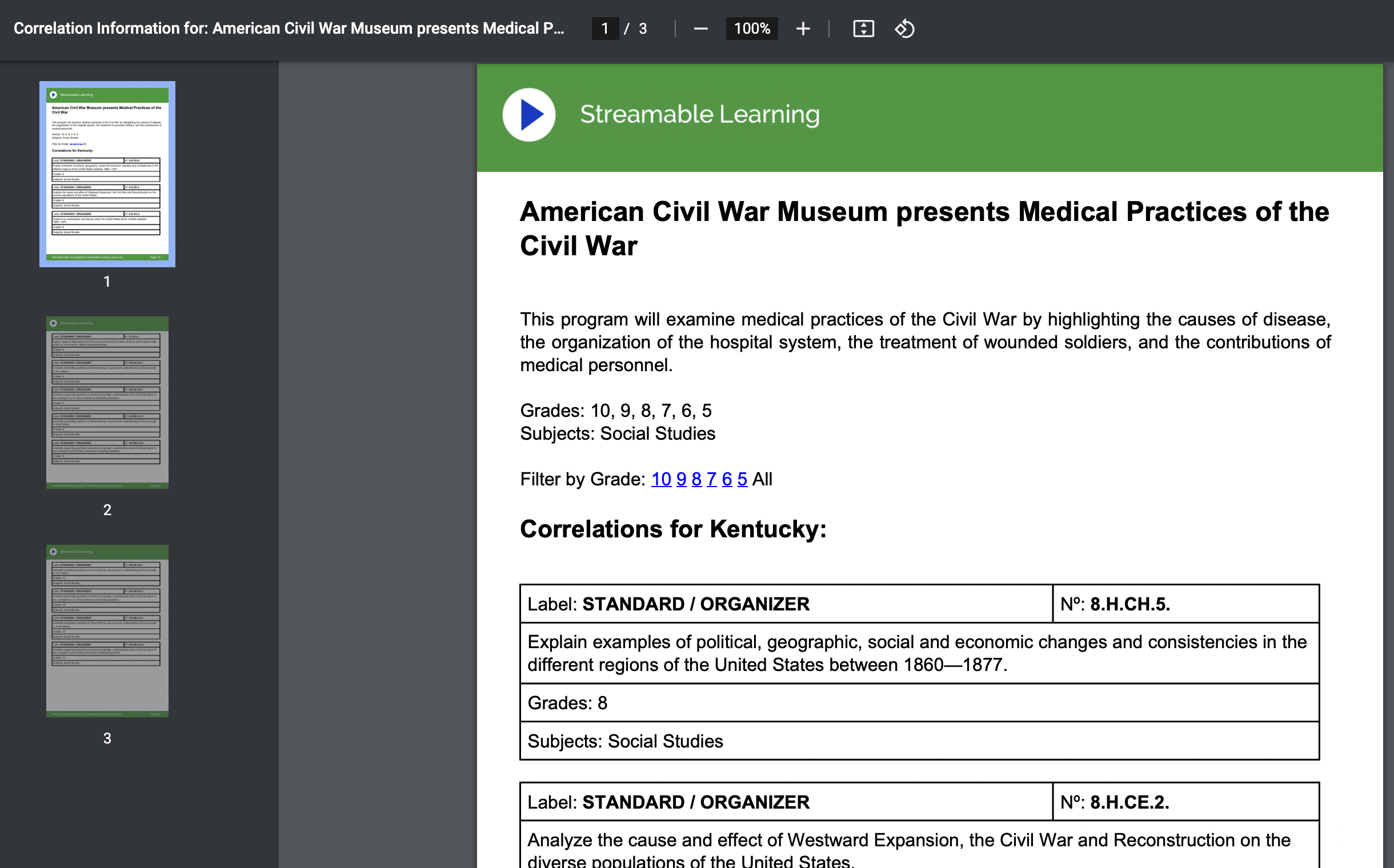
Many of these recordings also have a standards-aligned document to go with them based on a state of your choice.  However, once opened, some of these alignment documents say "Coming Soon" or there is no link at all because no standards doc has yet been made available.

The standard alignment document for the above recording.


A final feature worth noting is that a URL to a recording can be shared with a student directly.  In order to do so, the student will need your district's "code."  (A teacher can look up the code for their district.) Once a student clicks on the link, they will need to type in the district code or they can't watch the recording.  Again, Zoom is only necessary to participate in a livestream; no Zoom is required to watch a recording.

For a video overview of Streamable Learning, here's a screencast I made (11:00):


How could you use it?

Teachers have always loved bringing in a guest speaker, but that might not always be easy or convenient; similar issues with logistics hamper just jumping on a bus with 30 students and going to a museum.  (Especially if it's in Alaska or Australia!)  Streamable Learning gives a convenient, cost effective, interactive, safe way of bringing outside expertise into your own four walls.  Additionally, it's a great way to show authenticity around the content being learned in your classroom, by seeing more vivid examples of its use, impact and application.

Streamable Learning can also address equity issues and give some students virtual opportunities that they may have little to no chance to do in person.  An affluent suburban district may have parents that can easily afford supplementing the cost for that annual class trip to Washington, D.C. or Chicago, but for high poverty schools or rural districts already far away from their own local cities, this may not be an option.   Streamable Learning can potentially level that playing field.  

The ability to potentially share a recorded webinar with students via your district code opens up other options.   A student may get pushed a certain video that fits their personalized learning needs and passions.  Another may use a recording as a way of vicariously exploring a career path.  Or a group of students might benefit from a video to build schema for the focus of their project-based learning.


Downsides?

I wish that search results for recorded webinars were more logically organized, such as the most recent event at top and then going back in time, or perhaps have a few filtering options (alphabetically by partner, for example).   Also, it would be helpful if the standard alignment documentation was more consistent. While I understand this may possibly be uploaded sometime after the archived video is put online, several that I randomly found were missing this information even months later.  


While the platform costs, the number and variety of content partners and the ability to access previous webinars can make Streamable Learning a valuable instructional resource for students!


Have you used Streamable Learning or another "virtual field trip" platform?  Share in the Comments below.