Showing posts with label digital learning. Show all posts

Monday, April 8, 2024

GAMA Expo 2024 and KySTE 2024

As I previewed in a previous entry, I attended and presented at two conferences in March, but I've been busy since then and haven't taken the time to write a reflection on what I saw and encountered! So in today's entry, I'll share some highlights.  

GAMA Expo

The international GAMA Expo was at the recently renovated Kentucky International Convention Center, the first of its three scheduled years in Louisville.  I attended the day of my own presentation and the following day.  Not surprisingly as it is mainly a closed-to-the-public industry trade show, the majority of sessions involved game publisher announcements, or ways for gameshop owners to improve their sales, marketing, community partnerships, and so on.  In terms of help for education, it was mainly found on the exhibition floor where I walked the booths of various vendors and game publishers and discovered resources such as the following:

  • Academy Games have several historic board games, such as the 878 Vikings: Conquest of England and One Small Step (a "Space Race" simulation).  From a classroom perspective, I was heartened to see many of them advertised as requiring "15+" number of players.  Some of their games also offer a companion teacher's guide for sale, such as the Colonial Trilogy (first, second, and third) and Freedom: The Underground Railroad.  It was this last game in particular that compelled me to initiate a long talk with Uwe Eickert, Freedom's designer.  Players are abolitionists helping enslaved people escape to the North (meaning it avoids the problematic issues of players enacting the role of an oppressor or the oppressed), and as Uwe walked through the game's mechanics, "Freedom" seemed conscientiously honest in how it approaches, as Academy's catalog describes it, the "horrors and heroism" of the topic.
  • Beach House RPGs has Tim Beach as a Director, who wrote second edition D&D modules and expansion materials in the 1990's.   Tim wanted to design a TTRPG ruleset that has a much easier entry point for a beginning player, and the result is Start Here.  While the starter set has a default fantasy setting, other books include resources for sci-fi and other genres.  Start Here could offer teachers a great opportunity to adapt a simple, flexible game mechanic for their classrooms!  Materials will begin shipping in June 2024. For more information on acquiring the game, click here.
  • Liftoff 2.0: The Epic Space Race Simulation is a well-reviewed board game that has been around for over three decades (the first edition came out in 1989).  It is grounded in real science content and historical accuracy, and offers enough roles for several teams of students to simulate the American and Soviet Union's race to the moon.  According to its designer Fritz Bronner, Liftoff has been used in many classrooms.  However, be warned: perhaps fittingly for its realistic take on managing a space program, the game seemed complicated with lots of token pieces, tables of outcomes, and rules.
  • I talked with Andy Hand and Mike Johnson from Limitless Adventures.  They are huge fans of educators, and their "Limitless Encounters" card sets based on D&D fifth edition rules (such as The Blood Queen's Defiance, which Hand and Johnson were kind enough to gift me to review) offer an opportunity for students of an extracurricular club to "self-DM" a Dungeons & Dragons adventure.  Teachers might also use these card sets as inspiration on how to automate their own classroom academic TTRPG modules.
  • I briefly spoke with Matthew Orr from Wet Ink Games.  Wet Ink is a local Kentucky game publisher, and it's exciting to know the Bluegrass has such designers in its own backyard!


KySTE 2024

After missing the conference in 2023, I was excited to make it back to KySTE, as it returned to the Kentucky International Convention Center after years at the Galt House.  Ironically, I presented in the same lower level room as I had at GAMA the week prior!

The attendees for my KySTE 2024 session.

Like GAMA, I attended KySTE on the day of my own session as well as the following day.  While there were several standout sessions, I'll spotlight three.

In my last entry, I wrote about Chad Collins and his digitally infused, game-based design of the Spencer County Middle School "Academy Team" elective.  Chad and Michelle Gross offered an expansive and detailed explanation of that course with their session "Play to Learn: Building a Class with Game-Based Design."  Plus, they gave away what was easily the best swag I encountered at KySTE: bags with a d20 die and example "treasure cards" they use in their classes!


Keith Barnes, a Bullitt County digital learning coach, gave a thought-provoking presentation imploring us to "Go Beyond Using AI like a Magic 8 Ball."   He reminded us that the students should do the thinking even as the AI may do the "work."  In particular, the session centered on an intriguing perspective from a white paper by Drs. Ethan and Lilach Mollick that posited seven approaches for using artificial intelligence with students, with AI as Mentor, Tutor, Coach, Teammate, Student, Simulator, and/or Tool. 


William King (Director of Technology) and Megan Marcum (Digital Learning Coach) from Bowling Green Independent district used the running metaphor of space missions to describe their PD facilitation of a digital learning teacher cohort in their session "Teach2Transform, a Field Guide to Building Better PD."  Initially, William and Megan shared that only 47% of BGI staff thought the relevance of their PD was "very good" or "good," with relevance and continuity cited as the biggest barriers to BGI PD being effective.  With these survey results in mind, William and Megan found success by creating a cohort meeting six half-days throughout the year during the school day, with the focus being succinctly summarized as giving teachers "time, resources, space, and help."  Stipends were given for teachers to spend on resources for their classroom, although interestingly, they found stipends were not a primary motivational driver for the cohort.  The participants' own personal goals were paramount, as well as William and Megan using high quality frameworks for contextualizing the digital learning (in this example, it was the McLeod/Graber "4 Shifts" and Hebern/Corippo's EduProtocols). 

I'll end my highlights of KySTE 2024 with a great overview video, shot and edited (as always!) by STLP student engineers who also were the "IT help desk" throughout the conference:


Again, while these nearly back-to-back conferences made for a very busy March, I was glad for the opportunity to learn from so many people from so many places.

Saturday, March 5, 2022

Share Fair 2022

 After a year off because of COVID-19, Share Fair came back!

Last weekend, we held Share Fair 2022 and had several firsts, which included ending with a "campfire reflection" (attendees sharing takeaways and gratitudes for what they experienced that day) and door prizes donated by DreamBox Learning and Sixth and Main Coffeehouse.  But the most important "first" was a keynote presentation panel of Shelby County students that I moderated around the theme of "My Shelby County Personalized Learning Story."  I really have to thank Kerrigan Aldridge, Bryce Applegate, and Regan Ross for their poise, insights, and demonstrating such effective communication!

Last but not least, thanks to all who attended or presented on a Saturday morning.  If the comments during the campfire reflection was any indication, the Share Fair was worthwhile.

As I've done previously, I've documented the event via Wakelet, linked directly here as well as embedded below.


Tuesday, February 22, 2022

Edtech and preK-8 Literacy: A Template to Help with Deeper, Intentional Integration

If you are an educator who is wrestling with improving preK-8 student literacy, you likely are already very familiar with Irene C. Fountas and Gay Su Pinnell.  As their Twitter profile summarizes, they are "authors of books, videos, & websites that are considered standards in the fields of literacy and professional development."  Besides a very helpful website full of resources, they have also created a preK-8 Literacy Continuum published in a popular book, most recently given an expanded edition in 2016.

As a former high school English teacher with limited foundational elementary reading and writing instructional expertise, I have to admit that I did not have a deep knowledge of Fountas and Pinnell until Jill Brookman, our district Literacy Coach, met with me to discuss their Literacy Continuum book -- in particular, an intriguing part of the book that details their "Technological Communication Continuum."  (The entire book and its extensive Literacy Continuum has proven very effective in helping Ms. Brookman coach our teachers in improving their instructional pedagogy.) As the authors explain, the literacy of learners today is much more expansive than just engaging in printed text.  Students must also demonstrate their computer literacy (the use of various devices to "create documents, find information, and communicate with others"), online reading and information literacy (comprehending, as well as critically evaluating, such text), and composing and publishing digital texts (which in a multimedia world is much more complex than simply typing a story in a word processing program!) (pp. 346-347).   With such digital communication in mind, Fountas and Pinnell put their preK-8 Technological Communication in a continuum as a progressive set of standards, or in their parlance, "goals" to select.  These student "behaviors and understandings to notice, teach and support" are organized into two categories for each grade level: Digital and Media Literacy (reading, or the consuming of electronic text) and Communication and Publishing (writing, or the creation of electronic text) (pp. 348-356).

Ms. Brookman knows I am constantly looking for ways to more authentically connect learning objectives to technology integration.  (A recent example: how I crosswalked edtech with competency-based design principles, as featured in Eliot Levine's July 2021 CompetencyWorks blog entry.)   So she posed a challenge.  Using the Technological Communication Continuum standards, could I describe how a specific edtech tool could exemplify high rigor literacy?  Would these standards help me articulate how you can integrate edtech with greater intentionality in a teacher's lessons plans to invoke deeper student learning?

Challenge accepted!  As a proof of concept, I used Wakelet (a wonderful tool I previously discussed here) as my prototype modules; Wakelet is a natural fit for curating resources (reading) as well as storytelling (writing).  These two modules were organized around a template I created with several sections, such as:

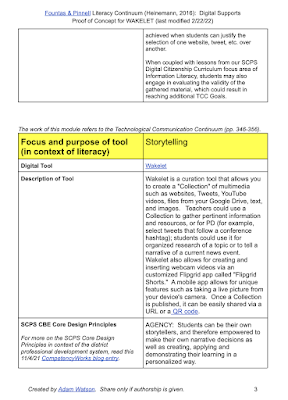
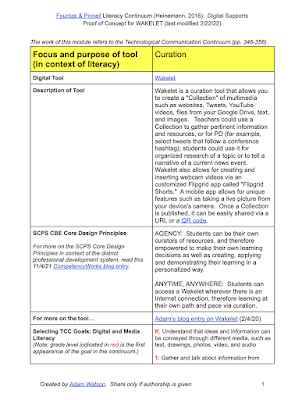
  • Description of Tool.  Explaining briefly what the edtech tool is, and how it works.
  • SCPS CBE Core Design Principles.  How does the tool align with our district's competency-based education beliefs what is best for learners, such as supporting student "Agency" or "Anytime, Anywhere" learning?  (These Principles were adapted from Aurora Institute's updated 2019 definition of CBE, explained here.)
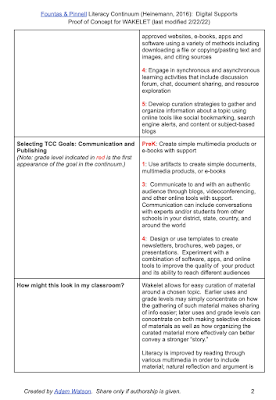
  • Selecting TCC [Technological Communication Continuum] Goals: Digital and Media Literacy.  What reading or media consumption Continuum goals does the tool best achieve?  The grade level where the goal is first stated in the continuum is highlighted.
  •  Selecting TCC [Technological Communication Continuum] Goals: Communication and Publishing.  What writing or media creation Continuum goals does the tool best achieve?  Again, the grade level where the goal is first stated in the continuum is highlighted.
  • How might this look in my classroom?  Further detailed explanations and concrete examples of how the intentional usage of the edtech tool helps further literacy. 

Both modules for Wakelet are together and viewable in the PDF linked here. You can also see screenshots of the first three pages of the document below, with the focus on using Wakelet for curation:


Besides Wakelet, there are certainly other worthy edtech tools that can go hand in hand with exemplifying these Fountas and Pinnell Technological Communication Continuum literacy standards.  I encourage others to use the template above to do so, and articulate their own deeper, richer synthesis of intentional edtech with more effective literacy instruction.  And I thank Jill Brookman for introducing me to the highly illuminating Literacy Continuum book!


Friday, December 2, 2016

PPBBL: Personalized Project-Based Blended Learning

Greetings, readers!  I never meant to take two months off, but we've been a busy county.  Our elementary rollout is complete, and we are now a 1:1 device district (iPads for Kindergarteners, Chromebooks for the rest).    I am spending a goodly amount of embedded time at our elementary schools to support our staff as they continue the transformation into digital classrooms.  Lately, as part of that work, I've been reflecting quite a bit on three educational strands that are strong on the radar of Shelby County and are current hot topics across the world: blended learning, project-based learning, and personalized learning.  This musing has lead to some questions of how and when these models are applied in classrooms.   (Note that these questions are not meant to imply critiques of Shelby classrooms specifically.  Instead, they are "thinkalouds" of how and when blended, PBL and personalized learning are generally utilized.)

BLENDED LEARNING:  As I discussed in a previous post, I'm a fan of Michael B. Horn and Heather Straker's definition as given in their book Blended: "Blended learning is any formal education program in which a student learns at least in part through online learning, with some element of student control over time, place, path and/or pace.”  One of the reasons I like this definition is that the end of it dovetails nicely into personalized learning itself (which if done in the absence of technology would be very difficult).  But it's important to not forget what is actually being blended: online digital tools with human interaction and instruction, usually in a brick and mortar school.  Both components, in a good balance, is necessary.  Content may be delivered digitally in an innovative way, but it is the teachers' roles in nurturing, nudging, and knowing where their students academically stand that make them an integral face-to-face resource.

Do we sometimes concentrate too much on the digital tool and not on the analog teacher or desired outcomes?

PERSONALIZED LEARNING:  This school year, one of Shelby's grass-roots and teacher-led efforts of innovation (encouraged and supported by John Leeper) is happening at several of our elementary and both high schools: 3PT classroom cadres.  Pilot groups of students in each building are exerting control over the path, place, pace and/or time of their personalized learning.  Ideally, your passions and your post-school plans should affect your educational journey and give you options.  Digital tools certainly make it easier to access content, assess mastery, and track progress; with a laptop and wifi, you can do your reading in a school's bean bag chair just as easily as your kitchen table at night.  To that end, I have been heavily involved in supporting tool integration to help the program hum along, such as Edgenuity (which contains coursework monitored and customized by teachers to deliver content) and Schoology (a learning management system that contains teacher and district curriculum, folders of links and resources, and assessment tools).  In 3PT, bell schedules and even chronological age differences fade away from the real focus: learning that is flexibly paced and about mastery, not compliance or seat-time.   (To see pictures and follow tweets about our district's 3PT stories, see #3PTSC; there is some awesome work going on out there.)   It should be noted that unlike differentiation or individualization, only personalization is student-centered.   However, we again must be vigilant for balance.  We risk impersonalized learning if this model leads to teenage cubicle drones, pecking in isolation at their laptops. Students should have a chance for discourse with their peers; teacher conferences and whole/small group instruction still needs to be a vital part of student learning.

How often do we concentrate on content delivery over student dialogue and groupwork?  Does technology enable an increase in both the quantity and the quality of teachers conferring face-to-face with students?

PROJECT-BASED LEARNING:  Since participating in PD on PBL in the summer of 2015, I have been excited about the ways it can combine personal student interest with relevant work that seeks to elevate or solve real-world problems, publishing or presenting to authentic audiences.   It is often collaborative and done by groups of students. The danger is that PBL could be seen as "one more thing" instead of a model that can integrate seamlessly with both personalized and blended learning.

How can PBL be brought more systematically into a personalized, blended learning environment?

Why I won't claim to have solutions to all of these questions, a few resources on the internet might point us in the right direction.

This resource and graphic from The Learning Accelerator is perhaps my favorite visual on blended learning.   What I appreciate is how it goes beyond a definition and concentrates on what blended learning can help you enable and accomplish.  Most importantly, blended learning should empower educators to make sure every graduate "attains the skills and mindset needed to succeed in college and life (academics + habits/character)."

Note: this graphic is part of a Creative Commons Attribution 4.0 International License.

Lately, educators are buzzing about Summit Learning, who recently has released a free digital learning platform, which includes a core content curriculum for personalized learning.   While the tool itself is fascinating, I am more intrigued by their school philosophy: content delivery should be only as important as the application of cognitive skills in the form of PBL work.  In a recent introductory webinar (visit their site for upcoming events), they shared the following example of a Summit school week:

Screen captured from an archived webinar, linked here.

Look how many slots are appropriated to PBL, in comparison to content acquisition time!  In addition, mentor time is scheduled and guaranteed at least every Friday.   While this may not be the perfect model, it does reveal how important authentic application of knowledge is to the Summit vision of learning, and shows how blended, personalized and PBL can weave together like a well-made rope.

Like any well-woven rope in education (he says with a tongue placed firmly in his cheek), an acronym is necessary for naming.  The significance of calling this balanced system PPBBL is even built into the order of the letters.  Personalization is the first priority and therefore the first letter; leading by student needs and interests quite naturally segues into project-based work; blended is the way to make it all work effectively and engagingly.  And learning should be the last word -- the point, purpose and result of these transformative models of education.

So we will keep pushing ourselves with our questions -- reflecting, refining, reinventing what it means to be in a classroom, or to be a student, or to be a teacher.   

[Note:  part of the inspiration for this entry came from my work with one of our district Instructional Coaches, Melba Bradley.  As we recently planned a PD session on blended learning for a teacher personalized learning day, we discussed how PBL needed to be a stronger component of a blended learning classroom, and the first version of this entry's mashup acronym was born.]

Thursday, February 4, 2016

Wizer

Worksheets are a nasty, nasty word in education.  Fair or not, they epitomize the "one size fits all" approach to mindlessly giving out the same photocopied work, year after year after year.  However, like other maligned educational words and phrases that have fallen out of fashion (like "direct instruction"), we must be careful not to throw out a good tool that has been used poorly in the past . . . especially if they get a twenty-first century upgrade.

Which brings us to the focus of this entry: Wizer! (That's pronounced like "wiser," as in "I hope to become wiser in integrated technology as the years go on.")  These self-described "blended worksheets" can become another powerful formative assessment for your digital classroom, despite the pedigree of the dreaded W word.

How does it work?  You need an account to either make or take Wizer worksheets, but registration is free and you can even use your Google account as a sign in.  (GAFE users, take note!)  Once logged in, look in the upper left of the page to access your previously created worksheets or to create a new one.

Once you choose to create a new worksheet, you must choose a theme.  (Like Google Forms in the beginning, there are a narrow amount of choices with some seasonal influences - I saw a Valentine related choice, for example - but you should be able to find enough variety.)  Next, you will see various ways of editing the worksheet at the top and right side.  At the top, you can indicate the grade level of the work or tag it with indicators.  Down the right side, you can save the worksheet as you go (there doesn't appear to be an auto-save), preview what it will look like to students, change the cover photo, and last but not least, edit the color and font of the worksheet's title.  The wording of the title itself is easy to click and edit, which will automatically give the worksheet its name when you look under "My Worksheets" in the top left.

In the body of the worksheet, you can choose various Tasks. Perhaps by design, the top row of choices are interactive, and the bottom row are more passive/informational.  So you can choose from interactive options such as matching, multiple choice, labeling a picture, and open response questions to more passive embedded material such as YouTube videos, pictures or links.  Another plus is how simple it is to edit Tasks and change the order of their appearance on the worksheet.

I'm particularly impressed with "Fill On An Image" and "Matching," which among online formative assessments are fairly unique choices.

For a video on how to create a Wizer worksheet, see below:


After the worksheet is completed, you go to the upper right to toggle the Publish button, and now you can "Assign to students."  From here, you can create multiple "classes" to assign the same worksheet for the sake of organization (and control turning on or off access class by class).  You can provide a link to the worksheet (in an email, a Schoology Assignment/Update Post, etc.) or directly integrate it with Google Classroom.

Note that you can choose to give or not give "Automatic feedback to students."


Once students complete the worksheet, you can go to your worksheet and click on "Assess Answers" in the upper right. Right/wrong answers (like multiple choice) will be automatically graded for you, and you can toggle through student submissions to manually grade Tasks such as open responses or override Wizer if it says a student was incorrect.  There is even a space for teacher comments. Once saved, all of this will be available to students when they next log in.

For a video on how to assign worksheets and assess student answers, see below:


Note that by default, all published worksheets are available in the public "gallery" on the home page of the site, which can be shared or copied to their own account by other users.  However, you can make your worksheets private by going under "My Worksheets," finding the worksheet you want to change, clicking the three dots button, and clicking on Make Private.

How could you use it?   The beauty of Wizer can be summed up in a sentence: it's a formative assessment that is easy to navigate with Tasks that could be used K-12.  If you are worried about the "one size fits all" of old school worksheets, why not make multiple versions and differentiate?  (You can copy one of your existing worksheets and edit it accordingly.)

Downsides?   Questions are automatically a point per answer; you cannot customize the values. There is no way to search public worksheets (currently, you can only browse the ones shown on the home page), but since worksheets can be tagged when created, I believe this is a feature likely to come down the pike.  While already packed with several Task features, I look forward to using other tools in the future such as drawing or audio.

Wizer is getting user input for which Task will be added next.

All in all, Wizer is a great new free online formative assessment that is already impressive.  If it continues to grow and improve, this could easily become a favorite in my toolbox.

Be sure to share a Comment below if you've used Wizer already or after you give it a try!


Saturday, August 22, 2015

Why Chromebooks?

Our fall deployment of take-home Chromebooks to all of our district's high school students (the first phase of an eventual 1:1 throughout Shelby County) is getting closer! The 2000+ devices are now imaged, and are currently being tagged for inventory.

Recently, a principal from another Kentucky county emailed and wanted to know about the advantages of Chromebooks over other devices.  They are certainly becoming a popular choice for educators; in the third quarter of 2014, Chromebooks outsold iPads (the previous lead selling device for education) for the first time in the U.S.  In the months since, that trend has continued, and widened. Of course, popularity alone shouldn't dictate your choices. But after reflecting on the principal's question, I realized I had an important topic for a blog entry.

I won't pretend that my reasons for why Chromebooks are a strong contender for your school or district’s digital conversion plan are terribly unique; just Google the question, and many of the following reasons will pop up. But I hope my thoughts on the subject and a few anecdotes will add something original to the discussion.


1. For writing and composition, a built-in keyboard trumps a touchscreen tablet.  Students find ways to “type” even on smartphones, and yes, Bluetooth keyboards can be purchased for tablets. However, Chromebooks (like other laptops) make long-form writing much easier right out of the box.


2.  The Chromebook naturally builds on the power of GAFE.  Since a Chromebook is in essence a plastic construction that surrounds and delivers a Chrome browser, the integration of Google Drive or Google Apps for Education (GAFE) should be a given. Creating Google Docs and using other Google web-based tools are naturally easy and intuitive on a Chromebook.


3.  The Chromebook will address 90% of the tasks your students want to accomplish.  When our district was exploring device options, we visited the Chicago Community Consolidated School District 59 (CCSD59) and spent time with Ross Vittore (Director of Innovative Learning) and the district’s Innovation Coaches.  Ross shared a great story that had a profound impact for us.  Early in CCSD59’s device decision process, they asked at a meeting of stakeholders (teachers, administrators, parents, and students) a simple question: “What do you want students to be able to do?”  When they compiled their list and reviewed it afterwards, they realized that with only a handful of exceptions (shoot HD video, run high-performance AutoCAD software), a typical Chromebook could do the job on a daily basis.  It is more important to look at devices from this end of the telescope than get mired in a “Mac versus Window,” "laptop versus tablet," or similarly unproductive discussion.  (Note that Chrome apps and extensions are always growing, and can even handle many traditionally program-based functions such as cloud-based video editing with WeVideo.) One last point to make: those existing iPad carts or desktop computers will still fulfill a need in a 1:1 Chromebook school, as they offer opportunity to access resources specific for limited-time projects.


4.  Under ten second bootup time!  The Chrome OS is extremely efficient, so when you turn on the power, the startup is quick.  This is different than, say,  a Windows laptop that can sometimes take a few minutes to get to the desktop which means you lose precious instructional time. If you don't have a 1:1 but want to use carts of Chromebooks, you can also set them up in "kiosk" mode which allows clean wiping of the hard drive as you quickly reset between users.


5.  The Chromebook does have offline capabilities.  The number one concern about Chromebooks is, unlike a typical laptop, “it can’t work without the Internet.”  It is true that Chromebooks are limited without the Internet -- but aren’t all laptops and tablets limited if there is no connection?  The bigger point is that the Chromebook does not become a brick if the Internet is unavailable. Once you allow the Google Drive to sync to your Chromebook, there are several functions you have even without Internet access, such as viewing and editing Google Docs, viewing PDF files, and accessing a thumb drive.  Remember also that edits of Docs will “update” to your cloud the moment your Chromebook hits the Internet again.  (For more about offline capabilities, visit this site.)


6.  Easy administration via an admin console.  With administrative privileges, districts can easily (with a few clicks of checking or unchecking boxes) change student permissions, push out apps and extensions, and other management functions.  For more information on Chromebook management, visit here.


7.  You can instantly swap out units as the Drive work is cloud-based.  If you had Windows, Macs, or tablets, work saved to their hard drives or personalized program configurations will be lost if the device “dies” or is lost.  On the other hand, since Chromebooks saves work to the Google Drive cloud, you will gain access to your work the moment you log in with another Chromebook.  (For that matter, you will have access to your files and folders once you log in with your Chrome browser on any device.)   Other personalized aspects, such as your Chrome apps and extensions, will re-install once you log in again.

8.  The cost of Chromebooks is lower than most devices.  I deliberately put this one last, since price concerns should not be the main factor when picking devices.  However, there is no denying this is an attractive feature of Chromebooks, which usually range from $200 to $300.  (The difference in price is mainly due to local hard drive storage space for downloaded files and the speed of the device’s processor.)  Also, Chromebooks choices are increasing; for example, a new model by Asus is a 10” touchscreen hybrid (Flip C100PA).

Before we leave this discussion, two final points to make.

First, be wary of thinking Chromebooks, or any one device, will be your "silver bullet." I briefly mentioned in #3 how Chromebooks can be a great complimentary device to existing edtech in your building. This is what I call "Garlic Necklace" thinking, and I expand on the concept in a previous blog entry.

Our superintendent Dr. Neihof believes strongly in the need for "deeper learning." In essence, deeper learning involves student self-directed mastery of multiple areas (content, collaboration, and communication) while maintaining an academic mindset. (It should be noted that education leaders need to be prepared for deeper learning as well.) This leads me to my second point. Technology is certainly a powerful means to this deeper learning, but is not the ends. We should be mindful as always that a Chromebook or iPad or access to GAFE is merely a vehicle on the pathway to deeper learning -- and without direction, a road map or intentionality, a vehicle might as well be in the garage.

Do you integrate Chromebooks prominently in your district or school? What are your thoughts on the device and its impact on student learning? Share in the Comments below.


Thursday, May 14, 2015

Garlic Necklace, Not a Silver Bullet


It's now been two months since my attendance at ASCD's Annual Conference in Houston.  Upon reflection, what I learned there is still permeating and percolating in my consciousness, and has already lead to some transformative action.  (To take one example, I incorporated what I learned from Aaron Sams and Jon Bergmann and changed my Flipping and Blending PD.)

One of the perks of ASCD membership is access to a wealth of resources, such as their monthly magazine Education Leadership.  In this month's May 2015 issue, a title of an article jumped out to me: "A Vision for Mobile Learning: More Verbs, Fewer Nouns," by Julie Evans.  As our district is waist-deep in charting our digital conversion course for next year and beyond, Ms. Evans reminded me that our concentration should NOT be on "the features of specific devices, concerns about infrastructure, and debates on policies to support (or limit) usage."  Rather, "educators need to pay much more attention to the learning goals associated with mobile initiatives" if they want to "transform teaching and learning."  As the title suggests, "the primary emphasis in many schools continues to be on the nouns of delivery mechanisms, rather than on the verbs that demonstrate the impact these devices have on learning efficacy and reaching important goals" (author's emphasis).

In my journey this year with our district, I have learned to juggle many nouns. Let's just examine Internet-capable devices I've found in our schools. Nearly every classroom has a Smart Board.  As the beginning of our digital conversion plan (and parallel with the creation of my position last summer),  teachers received either a MacBook Air or a Lenovo Yoga Win8 hybrid touchscreen laptop, a choice based on each individual school's decision.  Beyond that, devices for student use at each school include carts of iPads, laptops, Surfaces....and let's not forget labs full of desktop computers.  Looking ahead, we are currently neck-deep in discussion to determine what the student device of our 1:1 will be.

There is pressure to make the right choice, from within and without.  We want to spend money and time wisely, and make choices that will ultimately improve the learning of our students.  And like so many districts,  we eagerly wish for a silver bullet.  Can we find one clear tool -- for example, a student device -- that meets all of our needs simultaneously?

It then occurred to me, right in the middle of Evans's article, that the solution is not trying to answer that question but to question the question itself; in other words, to question the very premise of the metaphor "silver bullet."  Perhaps such narrow thinking in single-item solutions reveal bigger drawbacks.  We don't need a silver bullet that at best can kill a single werewolf; we need a garlic necklace that can affect multiple vampires, and all at once.  We need to change the paradigm and the metaphorical thinking.

Before you think I've gone looney (see what I did there with the moon reference?), remember I am a former classroom English teacher, and let me unpack my metaphors.

Why is a garlic necklace approach better?

  • More cost and time effective.  You just need garlic cloves and some string.  Silver bullets require...well, silver that's pricey, along with the time to smelt and shape the calibre bullet.  Before you pay considerable money on one tool, see if a choice can blend well with your existing materials people are already familiar with and meet your needs in an acceptable period of time.
  • Better longevity.  Garlic necklaces may do their job for days if not weeks.  Silver bullet is a "one and done." Will your choice of tools only meet one need and/or just fulfill one short term goal?  Sometimes that's necessary, but tools that can meet multiple needs of your visionary "big rocks" are usually better.
  • More user and environmentally friendly.  When it comes to tech, you need things that work well right out of the box with low learning curves whenever possible.  It should also play nice with what you have.  All you have to do with a garlic necklace is put it on and you're thwarting vampires.  Now consider all the ways a silver bullet can go wrong. It's useless without a firearm; if made even slightly wrong it won't fit the chamber; if you have bad aim, you won't have a chance to kill that werewolf.  How well does your edtech work on its own?  How easy is it to learn how to use it?  How well does it work inside your existing infrastructure?
  • Opportunity for personalization.  By the nature of what it takes to make a garlic necklace, yours will undoubtedly look a little different than mine, even if we are borrowing from the same bushel of cloves.  (Heck, you might even add a little flair.)   In the same way, even if utilizing the same cornucopia of digital tools or devices, a school or teacher might still customize how those tools will work together to serve unique needs.  On the other hand, from the very start of making a silver bullet, you are forced to consider the delivery system it is going in and make sure it fits.  We as educators often do the same thing with our digital materials: we force a tool to fit a prescribed perspective, without even questioning if the perspective itself is best for the "verbs" our students need.
  • Accepting messy reality instead of fruitless quests for purity.  Garlic cloves are less than perfect; they crumble and smell.  Silver bullets tantalize in their purity and tempt us to seek them out.  But be wary. I love Voltaire's saying that "Perfect is the enemy of good."  There may be times that a single tool as is meets all demands in its pure form.  More often than not, we must realize that a tool (or combination of tools) may meet many of our needs but hardly any one tool solves all of them.  Their are LMS's, for example, that do more or less than others and have varying prices. But it's possible you may have to pair a LMS with, say, an adaptive learning system that meet some of your other specific needs.  The key is, don't let the chase for "the" solution make you refrain from choosing any solution, even ones that are less than perfect.  You'll be fine as long as you always keep your objectives in mind.

(Yes, I noticed the irony of using a bulleted list to describe the benefits of a garlic necklace approach!)

It should be noted that there are times when one uniform tool might make sense.  For example, to make it easier on students going class to class, a school might benefit from choosing one LMS instead of using half a dozen.  But like anything, you have to weigh the pros and cons of conformity with the more essential needs for the school or district.

It is this type of open, honest reflection that goes straight to the heart of determining district and school level needs and the specific solutions that address them; for example, choosing a student device to purchase for a 1:1.  At first, it seems to make sense to seek the "silver bullet" -- something that does everything and does it with a twinkling flash.  After all, aren't the students worth a little silver?  But it would be better to determine your needs first, and see what resources you already have.  Maybe the correct answer to the wrongly worded question of "Do students need a tablet or a laptop?" is "Yes."  That's not to suggest that you have to have a budget-busting 2:1 or 3:1 or 5:1 initiative.  When considering a student device, if your main daily needs are accessing formative tools, playing streaming videos, sending emails, etc. and you only occasionally need a high-end video editing software suite or take pictures or run AutoCAD software for the entire student body (as opposed to, say, engineering students), do you have other resources to fulfill those short-term projects?   If you are like Shelby, the answer is absolutely yes -- see the third paragraph of this entry!  Indeed, it solves another hairy issue of what happens to all of your existing tech when you go 1:1.  It is not thrown away or sitting unused; the money spent on them has not been wasted. While your 1:1 device may be one kind of device, you still have access to laptop carts, iPads,  and computer labs (with large desktop hard drives and powerful processors) for specialized work.  And speaking of devices that do specialized work, let's not forget that many students already carry one in their pocket: a smartphone.*

All of this ties back into the article by Evans. Twenty-first century learners need that garlic necklace of options:
Students acknowledge that working with a smartphone or tablet can raise their engagement in class, but the stated reasons they value such machines have more to do with efficacy and the effectiveness of the learning process than with the compelling nature of the devices.  In addition, if we accept that most students' vision for learning places a high premium on social, untethered, digitally rich experiences, their optimum learning environment would have to include access to a wide range of mobile devices with differentiated functions that support many ways of learning and many kinds of final products.  One size does not fit all in students' prescription for effective mobile learning.
We must realize that "one size" -- one silver bullet device or tool, be it analog or digital -- does NOT fit all learners and modes of learning at all times.

As future-ready educators, our job is to not only be the "guide on the side" to facilitate their learning, but to also be the "dean of the screen"** that leverages the power of multiple mobile devices to meet students' needs.  On the way in that journey, we should not get hung up on operating systems or brand names or educational acronym fads. As always, the tools are merely methods to get students to communicate, collaborate, and critically think.  In the wonderful words of wisdom I will openly steal from Ross Vittore (Director of Innovative Learning at CCSD59), "We are not teaching students to Toyota or Honda.  We are teaching them to drive."


* I realized after originally publishing this entry that I had not even mentioned the power of personally owned smartphones or BYOD programs as part of a student's "garlic necklace."  I rectified that with a short mention here.

**After using this term, I Googled and found an obscure reference from the past.  Although used originally as a reference to cinema, I must give a nod of the head to J. Stuart Blackton for originally coining this phrase.

As a side note, the Evans article also has some great data on the results of Speak Up surveys from 2014 that include student voices on how they want to learn.  I was particularly interested in Project Tomorrow's recent white paper findings on "Digital Learning 24/7." The infographic "Ten Things Everyone Should Know about K-12 Students' Digital Learning," gathered from over 400,000 Speak Up participants, is highly recommended.