Education technology and game-based learning resources, tool tips, innovative pedagogical musings, and general "thinkalouds" of a Digital Learning Consultant. Follow my educational journey on Instagram, X , Threads and Bluesky @watsonedtech, my Facebook Page (facebook.com/edtechelixirs), and the blog hashtag #edtechelixirs. Note that opinions are mine alone, and reviews/mentions of edtech products do not qualify as an endorsement. Subscribe to the blog at bit.ly/signupedtechelixirs.
Showing posts with label virtual field trip. Show all posts
Showing posts with label virtual field trip. Show all posts
Streamable Learning is new to me, and something that I'm excited our district is launching this fall. I would consider it less a digital platform and more of an opportunity to connect with dozens of experts from institutes and museums not just across the United States, but around the globe!
Summed up in an elevator pitch, Streamable Learning gives students an opportunity to take a virtual field trip via two ways: registering for a livestream event, or accessing a voluminous bank of archived webinar videos from the past.
While access is mainly teacher-centered, some options exist for student access to prior recordings; more on that below. It should be noted that teachers will need the Zoom program to participate in livestreams, and that Streamable Learning is a paid service. Licensing is available at the school or district level, and homeschooling options are also offered.
How does it work?
Streamable Learning can whitelist your domain's email address so that staff can self-create accounts, or it will work with Clever integration (which is what we use in Shelby). Remember, only teachers and staff need accounts.
As mentioned, there is a wide range of content partners working with Streamable Learning. Once logged in, you can browse them by clicking on the "Content Partners" tab at the top. You'll see the partners first grouped geographically, then listed alphabetically. Click on a partner to see more information about them and additional links (for example, to their main website). You also usually see links to check for upcoming scheduled livestreams and/or archived recordings with that partner.
While many partners exist in the United States, quite a few are in other countries!
Example of information on a partner.
By clicking on the "Livestreams" tab at the top of the page, you can see their scheduled events for the school year via a calendar. (As of mid-July 2022, you no longer see the 2021-2022 calendar and the 2022-2023 has not been posted yet; it is usually up by early August.) The calendar allows you to find and register for a particular session, and there is no limit to the number of sessions you can choose. By registering, you will get the Zoom link emailed to you, along with a confirmation of the date and time. Streamable Learning told me that they usually have an average of a few livestreams scheduled every day Monday through Friday, with 400+ live sessions held over the course of a school year calendar. The sessions themselves are between 30 and 40 minutes. While the livestream will have some interactive elements such as a chat room and polls, remember that it is the teacher who has the Streamable Learning account and is technically the one logged into the Zoom; therefore, the teacher should be prepared to facilitate their students' discussions in their classroom and will be the one to type in the chatroom or make a poll answer choice on behalf of their students.
By clicking on "Recordings," you can access an archive of past sessions. (Be advised that some partners choose not to allow their sessions to be recorded and only livestream.) First, you will see a way to categorically filter for recordings via several checkbox choices, such as grade level and content area; it is also possible to type search terms in the search bar. One of the strengths of Streamable Learning is that is has surprisingly varied content. While Science and STEM are clearly popular, there are also Social Studies, Math, ELA, the arts, and even College and Career topics.
Note the numbers in parentheses. This indicates the number of recordings available for that particular filtered characteristic/category.
Once you find and choose a recording, they are playable on site; there is no need for Zoom for the end user.
An archive recording from an American Civil War Museum webinar.
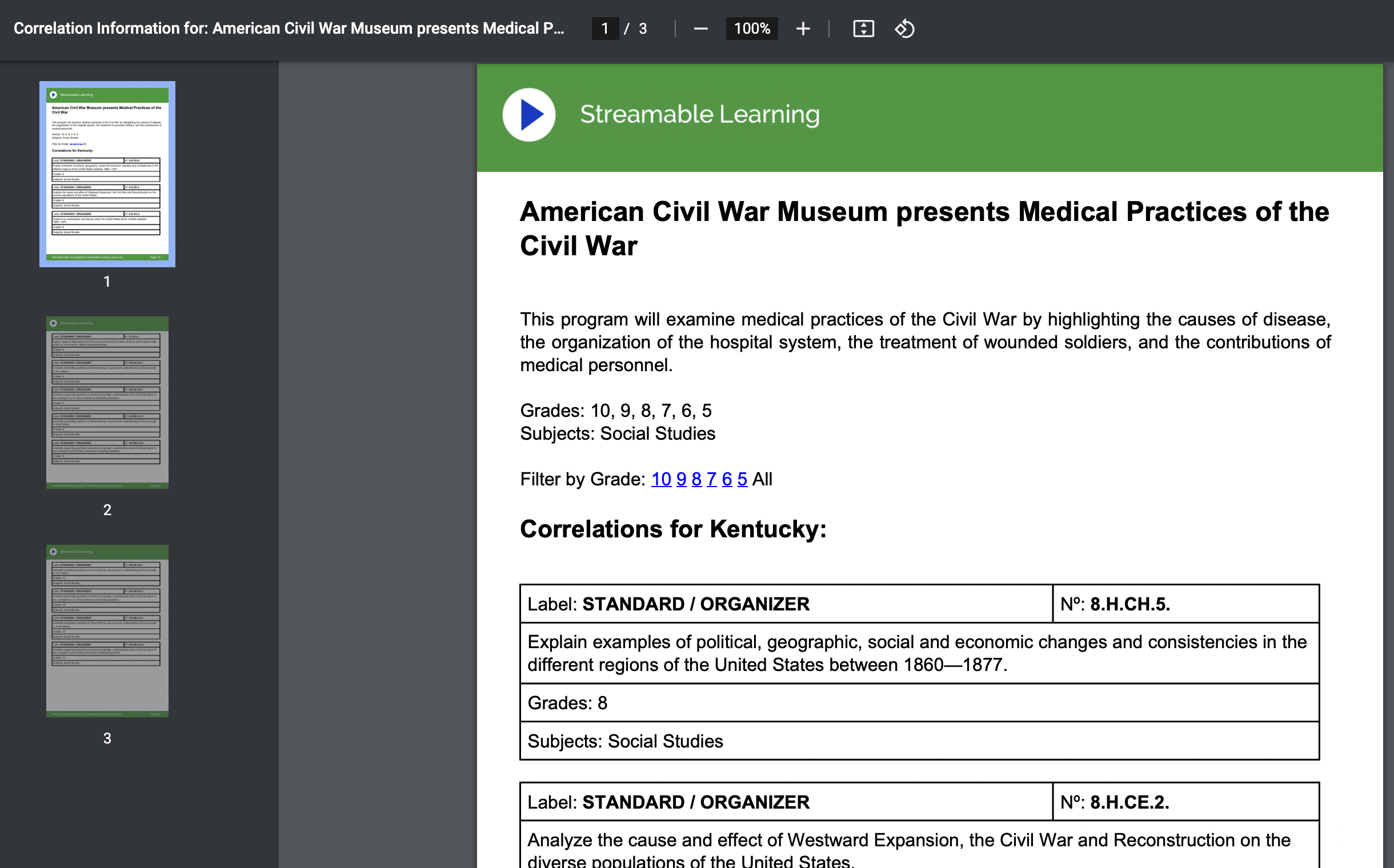
Many of these recordings also have a standards-aligned document to go with them based on a state of your choice. However, once opened, some of these alignment documents say "Coming Soon" or there is no link at all because no standards doc has yet been made available.
The standard alignment document for the above recording.
A final feature worth noting is that a URL to a recording can be shared with a student directly. In order to do so, the student will need your district's "code." (A teacher can look up the code for their district.) Once a student clicks on the link, they will need to type in the district code or they can't watch the recording. Again, Zoom is only necessary to participate in a livestream; no Zoom is required to watch a recording.
Teachers have always loved bringing in a guest speaker, but that might not always be easy or convenient; similar issues with logistics hamper just jumping on a bus with 30 students and going to a museum. (Especially if it's in Alaska or Australia!) Streamable Learning gives a convenient, cost effective, interactive, safe way of bringing outside expertise into your own four walls. Additionally, it's a great way to show authenticity around the content being learned in your classroom, by seeing more vivid examples of its use, impact and application.
Streamable Learning can also address equity issues and give some students virtual opportunities that they may have little to no chance to do in person. An affluent suburban district may have parents that can easily afford supplementing the cost for that annual class trip to Washington, D.C. or Chicago, but for high poverty schools or rural districts already far away from their own local cities, this may not be an option. Streamable Learning can potentially level that playing field.
The ability to potentially share a recorded webinar with students via your district code opens up other options. A student may get pushed a certain video that fits their personalized learning needs and passions. Another may use a recording as a way of vicariously exploring a career path. Or a group of students might benefit from a video to build schema for the focus of their project-based learning.
Downsides?
I wish that search results for recorded webinars were more logically organized, such as the most recent event at top and then going back in time, or perhaps have a few filtering options (alphabetically by partner, for example). Also, it would be helpful if the standard alignment documentation was more consistent. While I understand this may possibly be uploaded sometime after the archived video is put online, several that I randomly found were missing this information even months later.
While the platform costs, the number and variety of content partners and the ability to access previous webinars can make Streamable Learning a valuable instructional resource for students!
Have you used Streamable Learning or another "virtual field trip" platform? Share in the Comments below.
Despite the title, I want to start with the deep breath first.
Every year, I look forward to KySTE's three day spring conference at the Galt House in March. While there was a bit of a rumble over the slowly accelerating COVID-19 situation in the United States ("pandemic" was not quite the commonly used phrase, much less "crisis"), KySTE reassured everyone that the conference was still happening, albeit with advice to replace hearty handshakes with waves and wash your hands often. I assembled like hundreds of others to the conference's first day on Wednesday, March 11. There was talk about non-traditional instruction days (NTI) and students learning from home possibly happening as early as the following week, so I attended sessions with a focus on content-specific digital learning tools. By the morning of March 12, KySTE organizers were putting down rumors of an early end and still reassuring that the conference was continuing. By that same afternoon, in the second to last session of the day, they broadcasted a message: the conference was cancelled. We met for a hastily convened closing session, where door prizes were given out in 15 minutes, and promises were made to announce award and grant winners at a later date. A few hours later, I checked out of the hotel and on a whim, stopped by a grocery store on the way home, where I purchased the last packages of paper towels and toilet paper sitting on the shelf. The next day -- aptly enough, Friday the 13th -- I went to my Shelby office for final meetings and planning as we launched, along with so many other districts (and states!), the longest and most ambitious educational NTI plan in modern American times. I have not been back to my office, or seen my colleagues in person, since.
That was just two weeks ago, and yet it seems like a lifetime.
We are still very much in the beginning of a long term, once in a generation struggle that affects every aspect of our human life. It is overwhelming to think of the potential loss of life and the what-if's to come. So in this entry, I will try to only narrow my focus on the educational road ahead. I myself have overused the words "unprecedented" and "uncharted waters" these last few weeks, so I'm loathe to repeat them. But this is an unprecedented time to be a teacher. It is uncharted educational waters. What can we do?
Breathe.
It is clear that despite anyone's best efforts, the school year 2019-2020 will be disrupted. We have to allow ourselves grace. We will not hit all of our objectives. NWEA MAP tests, if we could even give them, might not reflect much "academic growth." And that is okay. It will become evident that we cannot maintain virtual schools for millions of students for weeks on end without consequence -- and that's not only okay, it's affirming! Of course we are facilitators of learning, but we are also relationship managers, inspirational guides, growers of human potential. We analyze body language, listen to stomachs growl, feel the energy of students as they connect to content. In short, teaching is a complex art, and difficult to do at a distance. If teaching was as simple as pushing a worksheet across a table -- well then, anyone could do it. Ask any parent who is social distancing at home right now with their children if teaching is easy.
So breathe. Students are still learning, in authentic ways we could not begin to fathom or calculate. Let your students know you are there, that you were always were there, that you will be there after all of this is over and all that remains will be the remembrances of the kindness and sympathies you gave to them in a time of uncertainty and sacrifice and tragedy. That is a lesson they will remember. They will remember you. The rest will work itself out in the months to come.
The very real tragedies and sacrifices aside, there are some positive "truths" to emerge out of this disruption to the status quo of education:
Necessity is the mother of invention, and teachers are being more innovative with digital tools than ever before because they have to be. If even a small portion of that blended learning experience (and other innovative pedagogies that challenge traditional instruction) comes back to the brick and mortal classroom, education will be better for it.
We need to stop talking about digital inequity and start solving it. In other countries, Internet access is just another utility that all citizens have, like water and electricity. This crisis clearly reveals that high speed Internet in every household is not a luxury but a necessity.
Public education needs to be fully funded and supported. If there was ever a question about the enormity of services that public school provides as a social safety net, it should be easily answered now. What organization besides public school systems could so quickly have marshaled resources like technology, educational materials and food for the general good? (This is not to disparage the efforts of our private, charter and parochial educational colleagues, but it's merely reporting the facts about the enormous power, effort, and reach of public schools.)
Last but not least, technology is best when it serves the objective of personal human connection. I am astounded and inspired from social media posts at all the ways teachers are using tech to foster continuity, engender hope, ignite excitement, and share a smile. Learning should always be engaging, but not in absence of addressing the individual passions and needs of each student.
As I wrap things up, I want to offer two NTI resources for educators in these (here I go) unprecedented times.
#KyGoDigital invited me to lead an online session as part of their #MyNTIKy series. I discussed virtual field trip resources and strategies on how to use them. The video is here (38:16):
Several people have asked for our Shelby NTI resources. While I've curated them (quality over quantity was my mantra), I have to thank many district staff members for their input and submissions, and I hope to have put the tools and sites in some sense of context rather than just reproduce a list of links. Here is our Doc.
While I'm thanking SCPS people, I want to give a personal shout out to all of our Shelby admin, teachers, food service workers, custodians, technicians, counselors, and other support staff for their heroic efforts to keep our children fed, educated, and safe these last two weeks and in the weeks to come.
Last but not least, I want to thank all of my Edtech Elixirs readers over the years, not only for reading this particularly long post, but for reading any of my past ones! This entry marks my 150th blog post since I began nearly six years ago. To put it mildly, in the summer of 2014 I could never have predicted the state of education in spring 2020.
And speaking of spring! Next week, spring break begins for our district and for many others. I promise you I will try to breathe a bit. Promise me you will do the same.
Welcome back to school! Due to a new K-8 school being built, Shelby County went to a contingency calendar and our first day back for students was today. So most of you have at least a few weeks head start on us.
Since my last entry, Edtech Elixirs has hit a happy birthday milestone. My first entry was August 1, 2014. That makes the blog five years old, with an average of a thousand views per entry (as of today, 141 entries and over 141,000 views)! Not coincidentally -- as the blog began partially as a resource for Shelby educators -- I also had my five year anniversary with the district as well. As always, I thank my blog readers for giving me the audience to share my edtech findings and think-alouds, and I thank Shelby County for allowing me to follow my edtech integration passion.
And now onto today's topic focus . . .
Back in June, I attended the third annual Deeper Learning Symposium hosted by Jefferson County Public Schools. One of the presenters was Danna Pearsall, who shared her knowledge on Nearpod. I learned about a few new features, including the ability for students to take (and then download) notes while participating in a Nearpod Presentation. These notes -- complete with the slides themselves --- can even be added to their own Google Drive! (It should be noted that the notes feature is only available if the presenter gets the paid version of Nearpod. More on that in a bit.)
An example page from downloaded student notes. This is a premium "Gold" (i.e. paid) feature of Nearpod and needs to be enabled by the teacher.
Before I go any further, I should mention that Nearpod itself feels like an old friend that I actually first tried out back in my classroom teaching days. When I came to Shelby, it was one of the earliest edtech tools I recommended to staff, and I wrote about our teachers using it in the first year of Edtech Elixirs. As much as I admired Nearpod in the past, I continue to be impressed as it grows, thrives and improves in 2019 and beyond.
What is Nearpod? Put simply, it is a teacher-paced, guided presentation tool with interactive elements that can help you assess your students in real time, as well as give you data reports to analyze later. Although you can create a presentation from scratch inside Nearpod, most will prefer importing a finished one into the platform, and that is where I want to make a tangent before discussing more about the tool itself. The real power of a tool like Nearpod is that it is a schema scaffold for tech-hesitant teachers to expand their edtech integration ability into the classroom.
How do we reflect on the deepness and richness of edtech implementation? Consider SAMR as a way of analyzing the net effect (pun intended!) of when technology is integrated into a classroom lesson:
Substitution is where new tech replaces old digital/analog tools, but the task is unchanged.
Augmentation is the same task, but there is more functionality and improvement of effectiveness because of the technology.
In Modification, you have redesigned parts of the task, and begin to see the transformative nature of the technology use.
Redefinition is the ultimate transformative experience that usually reaches an audience or collaborators outside of the four walls of the classroom. Here, we design and create tasks previously inconceivable thanks to the technology.
One of the things I love about SAMR as a reflective tool is that the focus is on the task, not the technology. There are no points earned in SAMR for mere edtech usage; it is all about integration and intentionality. As an example of this, consider Skype. When it first became a mainstream tool, it seemed like something out of a sci-fi show. (On a screen or flat panel, Skype stillreminds me of the Star Trek viewscreen on the bridge of the Enterprise.) .However, if you got a person to Skype into your classroom and just ends up a talking head that is remotely piloting a PowerPoint, how transformative is that compared to a guest speaker coming in person and droning on for an hour? You are, from a learning perspective, breaking even at best. If it is a non-interactive lecture, one would be better off with the guest shooting a video, burning it on a DVD, and mailing you the disc. (At least you could pause a DVD!) As you can see, it is not Skype itself, but the use of Skype that has to be analyzed via the SAMR lens. So it is with any technology you bring into the classroom: you need to first consider your task at hand and the academic objectives you want to meet.
The act of going from S/A to M/R means going from tech enhancement to tech transformation of what a learning experience can be, as well as going from a teacher-centered to a student-centered environment. Who is making the tech choices? Are students creating or consuming? Put another way, if the electricity and Internet go out, a S/A lesson can theoretically be improvised and continue ("I'll guess I'll lecture without pictures," or "I'll hand out a multiple choice quiz on paper instead") whereas a M/R lesson would be dead in the water.
Understanding SAMR is all well and good, and most teachers can make a Substitution move fairly easily, such as going from an overhead projector to a PowerPoint. The struggle is finding a pragmatic way to get to "AMR" edtech integrations. Here it is a question both of appropriate tools that stretch without overwhelming the educator, as well as finding a judgment-free way for the educator to grow their pedagogy. While Substitution often (but not always!) is typical of a traditional pedagogical environment (i.e. direct instruction, lecture-minded, teacher-centered), it is unrealistic to assume an experienced teacher can or even should jettison all of their former skills and tools to move into a transformative pedagogy. Indeed, there are times that Substitution (or no tech at all!) might be best, or traditional lectures and direct instruction may be necessary to properly meet the specific and contextual academic objectives at hand. The only concern is being stuck in an instructional rut of always doing Substitution/traditional approaches when other ways might be more effective or impactful on learning.
And that is why a tool like Nearpod can be a powerful tool, especially for teachers just learning to grow their edtech practice. Nearpod's original genius was its assumption that many teachers already have a storehouse of instructional material -- PowerPoints. Nearpod makes it easy to import these pre-existing PowerPoints into Nearpod Presentations. All that's left is adding interactive elements such as polls, open ended questions, "draw it" features, and quizzes. When a teacher is ready, he/she turns the Nearpod Presentation into a live session. A nice bonus: since the session will be pushed to the students' screens, you don't need a main projector or display. A student doesn't need to create an account; the teacher's live session generates a unique code only good for the current event, and a student easily joins the session with that code and signs in by providing their name. (While there are apps for Nearpod that makes it somewhat easier to join a session from a mobile device, any device with a browser and Internet access will do.) The pacing -- that is, when the slides advance -- is completely in control of the teacher. When interactive elements occur, teachers can see the data in real time, and even share a student answer anonymously to all the screens for the sake of discussion or highlighting a good model example. At the end of the live session, a final report is generated for the teacher where you can review the data/answers from all the interactive elements as a PDF. Thus, Nearpod's potential for Augmentation and beyond can be plainly seen. Students are interacting with the teacher, content and each other in new ways; a teacher can use the assessment data to impact and change instruction in real time as well as for future planning; a student can think and reflect more deeply via the interactive assessments than a Scantron bubble test could ever reveal. And imagine if, instead of Slides and PowerPoints, students created Nearpods to lead interactive presentations, or to gather data from a user group as part of a Design Thinking invention process! In short, Nearpod allows for genuine blended learning.
Here is a video which demonstrates how Nearpod led an instructor from his former mode of PowerPoint presentations and pushed him forward to a transformative classroom (1:13):
It should be noted that while the features mentioned above can all be done with the free Nearpod version, paid versions exist (currently $120 and up annually for an individual license) that give additional tools. The licensing is based on a teacher, or "creator" account -- a student participating in Nearpods never has to pay or even make an account. Additional features for the paid version include some additional interactive/inserted material elements (such as inserting YouTube videos), increased online storage space for your Nearpod Presentations (from 100 MB to 1 GB and up**), enabling the student notes feature mentioned earlier, and perhaps most importantly, the ability for students to do a Nearpod Presentation "anytime, anywhere" (perhaps personalized to student needs!) instead of only when a teacher makes a live session.
If you are interested in pre-made Nearpod Presentations, there is an online store. Thanks to a multitude of partnerships with companies such as Common Sense Media, Teaching Tolerance, CK-12, PhET, Newsela, and BBC Worldwide, the catalog is deep, with high quality lessons across a wide gamut of content and grade levels. However, while some of these are free, many of them cost from a few dollars for a single lesson up to approximately $30 for a bundle.
Other features of Nearpod that have been added in the last few years include:
Google Slides Add-On. There already was a free Chrome Extension (Nearpodize) that could take your Google Slides and convert them into a Nearpod Presentation. However, you can now easily insert interactive material while creating your Slides, then upload it all to Nearpod. From the Slides menu, choose Add-Ons > Get add-ons and search for Nearpod. Read here for more details.
Nearpod 3D. You have a gallery of over 100 three dimensional, manipulatable objects to insert into your presentation. Students can rotate them and zoom in and out. The gallery categories are Ancient Times, Amazing Places and Things, Environment, Human Body, and Microscopic. Read here to find out more.
Nearpod VR. Imagine taking your students on a virtual field trip and seeing a place in a 360 degree environment. Nearpod has an extensive amount of VR Presentations in their store -- some free, some not. Two things are outstanding about Nearpod VR. Firstly, there are incredible choices across multiple contents -- even ELA and math! (Recently, lessons were added that incorporate Historical Perspectives and Literacy, which fits nicely with new social studies standards.) Secondly, Nearpod VR works fine on any device, including Chromebooks. While phones in goggle headsets may make VR more immersive, Nearpod VR requires no special equipment or setup. For more details, read here.
The Nearpod Google Slides Add On allows you to insert activities while composing your Slides, which then can easily be uploaded / converted to a Nearpod Presentation. Note that some of these activity options only work with the paid version.
If there was a downside to Nearpod, it is definitely the price point for the premium features. While I appreciate what you get for free, and that the paid licenses have likely enabled Nearpod to endure and improve for all these years, I just wish there was a tier between free and $120+. Perhaps a middle option of $20-30 a year to allow student to take notes and teachers to give students Nearpod Presentations that are personalized "anytime / anywhere" lessons/homework?
Nearpod starts with existing edtech schema and pedagogy (PowerPoints, direct instruction, lecture) and builds upon it to create a deeper learning experience. I could mention other edtech examples that do the same, such as Google Docs, which takes what teachers and students already know about word processor programs and has the potential to improve the task of writing itself (i.e., Google Docs allows students to have real-time collaboration and use Comments for more effective peer feedback). The point here is that tools like Nearpod and Google Docs stand on the threshold between traditional and transformational pedagogy. These tools are part of a much needed bridge of a larger transitional pedagogical framework, necessary for improving not just edtech integration, but the nature of teaching and learning itself.
**Update: the storage size is updated, as of 8/14/20. As with all edtech, other elements of Nearpod described in this entry may also change over time.
We are on the verge of history! In my last blog entry, I discussed our upcoming 1:1 Chromebook deployment to high school students. Now, we have announced dates (Sept. 22-24, 26), which is just around the corner. Expect some tweets on our device deployment nights.
Meanwhile, I want to discuss a new web-based tool called FieldTripZoom. After they followed me on Twitter, I visited their site and was intrigued. When I reached out with some questions, I was fortunate enough to speak with FieldTripZoom's founder and CEO, Michael Pfannenstiel. The more I heard, the more excited I get about the possibility of how FieldTripZoom could impact student learning.
What is it? It would be easy to call FieldTripZoom simply a "virtual field trip," but this is more than just another Skype session or Google Hangout. It is more accurate to call these programs "live interactive experiences." Most of the programs are not simply lectures, but have several planned activities that involve students learning on their feet and with their hands. Some of the program's fees even include shipping a kit of materials to be used by students. (One memorable program with the Alaska Sea Life Center involves "The Scoop on Poop," where you are shipped a collection of sea lion scat in order to analyze their feeding ecosystem.) This short video trailer shows a class not just listening to a presenter but also applying their knowledge and skills.
The list of programs in their catalog (available for viewing once you sign up for a free account) is remarkably deep and diverse for a company that has only been around for half a year. You can filter the options by category or just browse them A-Z. I saw everything from the Baseball Hall of Fame to the Columbus Zoo to the Denver Art Museum to the International Spy Museum to the Royal Botanical Gardens. The offerings are also targeted for a range of K-12 classrooms.
It should be noted that for an increasing number of programs, FieldTripZoom also are creating online interactives, which is perfect for our soon to be 1:1 district. (Of course, teachers may want to develop their own digital pre- and post-formative assessments around the program as well.)
FieldTripZoom does have a screening process to make sure the programs are Core Content-aligned interactive experiences with educational value, from a presenter who is an expert in their field and can interact well with young people.
The technical requirements are easy: after creating an account on the site, you just need a computer, projector, and a webcam, and the teleconferencing software is simple to install. Next, you choose a program, take care of the purchase price, make arrangements with the presenter on the day and time, and be ready to blow the minds of kids.
While these programs are often paid by individual teachers, Michael noted that if districts wanted to deposit a minimum amount in a fund, they could set up a "bank" where teachers could check out programs either freely (first come first served) or with administrative oversight.
How could you use it? In a time when actual field trips are difficult to pay for or schedule, FieldTripZoom provides a viable and valuable alternative.
However, FieldTripZoom also could create a much deeper learning experience. For example, it could be a part of a PBL where students can get authentic, real world interaction with experts in the field to drive their data collection (have students uncover content rather than a teacher "covering" it). It may even be a model where the student product of a PBL is to create their own "programs" for other students. Think of the authentic payoff of high school seniors and juniors teaching a concept via Skype or Google Hangout to elementary students, which would include creating an interactive kit that involves their targeted audience.
Downsides? There is obviously the cost of a program, which at first blush may sound prohibitive. However, consider that if a class of 30 students each paid $5, you would cover the cost of an average program, and there are grants and other financial opportunities (including a handful of programs that are free). Compare that to the cost of an actual field trip, not to mention the logistics of permission forms, student medical and allergic concerns, etc. The other issue is not to forget the spatial and kinesthetic value of actually walking the halls and meadows on actual field trips. Sometimes you have to just put down the technology and breathe life in. It may be more Core Content-aligned to always quantify and spell the flowers, but we shouldn't forget to smell them too.
Shelby teachers, are you interested in FieldTripZoom? Have any teachers out there already used one of their programs? How did that impact student learning? Let me know in the Comments below.
(Full disclosure: FieldTripZoom is a proud supporter of EdCamps around the nation, and will be one of our EdCampKy sponsors in October.)