Education technology and game-based learning resources, tool tips, innovative pedagogical musings, and general "thinkalouds" of a Digital Learning Consultant. Follow my educational journey on Instagram, X , Threads and Bluesky @watsonedtech, my Facebook Page (facebook.com/edtechelixirs), and the blog hashtag #edtechelixirs. Note that opinions are mine alone, and reviews/mentions of edtech products do not qualify as an endorsement. Subscribe to the blog at bit.ly/signupedtechelixirs.
Showing posts with label personalized learning. Show all posts
Showing posts with label personalized learning. Show all posts
A few weeks ago, I was fortunate to have the opportunity to be in New Orleans attending the annual Aurora Institute Symposium. It was my fourth time over the last decade, and my second time presenting! I discussed tabletop roleplaying games in the classroom, particularly from the perspective of personalized competency-based education (CBE) and equity.
Special thanks to my colleague Kathy House for taking photos of my session.
Besides my gratitude at being able to lead a session, there were plenty of memorable learning experiences, from keynotes to breakout sessions to chance encounters in the hallway. Here are a handful of highlights:
Rhonda Broussard was a keynote speaker. (Later, I purchased her bookOne Good Question and was excited to get it signed!) She helped me think differently about classroom inquiry by posing the following three characteristics of what makes a good question for students:
It's not about the teacher (don't reveal your own teacher bias).
Anticipates multiple perspectives.
Requires mixed-methods reflection (needs sources outside of yourself).
There was a student panel (led by Broussard) which generated some great quotes. Samarah Bentley, a freshman at LSU, pointed out that when looking at what we value in school, an educator's "investments reveal your intentions," and when including students in your learning space, it should be beyond tokenistic representation in your curriculum or just asking survey questions, but a true dialogue: "Not just input, but an exchange!" When Broussard asked the students to pose one good question for us in the audience, David Ramirez (a student at New Orleans Charter Science and Mathematics High School) gave a powerful plea: "Will you listen?"
Representatives from CAST -- Melissa Sanjeh (Senior Professional Learning and Implementation Specialist) and Sherann Jackson-Alkins (Head of ABCD University HS, an alternative school in Boston) -- shared some wonderfully pragmatic and effective tools when universally designing for learning (UDL). I particularly liked the website's interactive guidelines, as well as the idea of "journey mapping" to see the lesson/unit from the perspective of different students to determine barriers and plan for scaffolding.
Another keynote by Sabba Quidwai on artificial intelligence reminded us that our concern that AI is producing the work and not the human doesn't quite fit how we treat assistive, collaborative writing in other contexts: "Politicians have speechwriters. Authors have ghostwriters. Musicians have songwriters. Entrepreneurs have investors."
Finally, it was good to run into old friends. Laurie Gagnon and Chris Sturgis reminded us where we've been and where we are going with CBE. Karin Hess, Jonathan Vander Els, and Brian Stack have recently published a wonderful new book Elevating Competency-Based Learning in a PLC at Work (full disclosure: I'm quoted in the introduction and first chapter!) and ran a helpful session about effective professional learning communities. With an introduction from David Cook (former Kentucky Department of Education Director of Innovation), Adrienne Usher, Jesse Bacon, and Michael Ekbundit shared how strategically and intentionally they have involved the Bullitt County community with implementing their Graduate Profile. Sarah Snipes (the current KDE Director of Innovation), along with members of the University of Kentucky's Center for Next Generation Leadership (Susan Dugle, Karen Perry) and the Center for Innovation in Education (Gretchen Morgan), discussed Kentucky's journey toward a local assessment accountability system. Last but not least, my OVEC colleagues Carmen Coleman, Lacey Eckels, and Rachel Albright presented on their portrait of a learner work with Kentucky's Fayette County Dixie Magnet Elementary School.
My embedded Wakelet collection below has an expanded story of my Symposium experience with additional resources and links. Be sure to also check out social media posts from the event using the hashtag #Aurora24.
Chad Collins has been with Spencer County Public Schools (KY) since 2013, first as a middle school social studies and ELA teacher, and currently as the campus Gifted and Talented Teacher for Spencer County Middle School (SCMS) as well as Spencer County Elementary School. He is also one of the SCMS Academic Team Coaches, which led to the start of the journey that is the basis for today's blog entry.
Not long after Chad began at SCMS, principal Matt Mercer wanted to try something different during fifth period schoolwide: Mercer envisioned all students receiving extra time for reading and writing enrichment. Chad and the other Academic Team coach and SCMS science teacher Sarah Parnell pitched the idea of having an Academic Team elective class for its team members during the same period. Mercer agreed, and the course was born. This elective would eventually not only grow to include students who are not Academic Team members, but also in sheer numbers; in 2023-2024, the roster is over eighty students, split by grade level into three classes, and SCMS math teacher Michelle Gross joined Chad and Sarah to become the third teacher to lead a section.
As the years went on, Collins, Parnell and Gross all felt the Academy Team class needed to be a deeper learning experience, but how? In the summer of 2023, Collins had an epiphany. He had learned about the work of KyEdRPG educators, particularly John Brewer of Jefferson County Public Schools. (Here's a fortuitous X exchange between the two!) While not a tabletop roleplay gamer himself, Chad has played video games since he was a child, and recognized the DNA of the latter was built on the former: “While I don’t have much experience with these types of tabletop games, and definitely not running that type of thing in my classroom before, I’ve been playing video games that use many of the same systems that are in these games since I was the age of my students or before." With that in mind, Chad was the architect behind the new structure of the elective course: The Academy. In the following YouTube video (where the previous quote came from!), Chad explains in more detail why and how The Academy was created (19:17):
We should also give credit that Sarah and Michelle didn't hesitate to embrace the course design for their own grade level sections, and since the launch of The Academy, have added their own content materials and revisions.
But...what is The Academy, and how is it different? Storywise, the premise is that students have been transported into another world where they are enrolled in "The Academy," a place similar yet different from their own. Each quarter, students choose one of several "classes" (in the TTRPG parlance of the term) in order to pursue their studies: The Bard (arts & humanities), The Beastmaster (language arts), The Magician (math), The Ranger (science), or The Knight (social studies). Each of these classes has a corresponding Google Site as first designed by Chad, which consists of unique, personalized paths of learning. These pathways have a series of Main Quests (must do’s), Side Quests (should do’s), and Feats of Strength (aspire to do’s). In actuality, these Quests and Feats form various Mastery Checks of learning that are assessed by the teacher, and if the student does not meet the requirements, are asked to revise and resubmit. Successful completion of the Main Quests earn Experience Points (XP) and this total amount earned is what eventually determines the student's grade for each quarter. This progression of XP can be monitored by students and parents alike in real time on, fittingly titled, Progress Trackers (Google Sheets) embedded in the Google Sites. Successful completion of Side Quests can earn "coins" that can be used to purchase items from an in-class "market." Lastly, completion of most Feats of Strength are for learning enrichment and the "honor and glory" of helping the whole Team, as opposed to coins or XP.
Chad was kind enough to let me copy and create sample snapshot versions of each of The Academy's class Google Sites midway through the school year, which you can preview below:
Chad would be the first to acknowledge the pedagogical structures that undergird and inspired The Academy. For one, it's a brilliant example of competency-based education, with tenets such "meaningful, positive, and empowering" types of assessments; students having different learning pathways; and mastery of learning, not seat time, is the metric of progression allowing students to "move when ready" to new content or higher levels of complexity. Secondly, the language of structures like must do's/should do's/aspire to do's, Mastery Checks, and Progress Trackers come from the Modern Classroom Project.
Many digital tools are employed in The Academy, both in the design of the course as well as students' day-to-day instructional interaction. Chad used several artificial intelligence tools, such as Eleven Labs (to create a narrator voiceover for a video introducing students to The Academy), Midjourney for images, and ChatGPT for monster and scenario descriptions. For content delivery and note-taking work, he uses Edpuzzle; for Main Quest Monster Hunts, there is Quizziz. For "sparring sessions" (where students review content via some friendly competition), Chad rotates through several tools, such as Gimkit, Blooket, and Quizalize.
The display case outside of Chad's classroom. Note the d20 dice, the examples of "Treasure Cards," and the "Roll for Prizes" chart.
In my in-person visit to Chad and Michelle's classrooms back in November 2023, I was a delighted witness to some of these sparring sessions. Since most of these head-to-head digital tools embed a leaderboard indicating ranking of winners, this allows an incentivization protocol where the top three student finishers use a d20 die to roll for prizes and therefore draw from an indicated jar. Some of these tokens include stickers and candy, but a premium item is a "treasure card" worth an "upgrade" in class. Here are some examples:
The student agency was palpable in these classes, as was the joy of learning. From the perspective of TTRPGs, there were so many wonderful elements present, yet the only thing really "missing" was the actual playing of a role-playing game! Chad shared that he was looking to have more cross-content, collaborative opportunities for his students, so creating some group mini-RPGs modules may be in the future. I'm excited to see how The Academy will "level up" in the years to come!
Speaking of the future, Chad may now be a Gifted and Talented Teacher with new responsibilities, but part of the agreement for taking his new position is his ability to still teach his section of the SCMS fifth period Academic Team elective. With that in mind, Chad shared that he would appreciate any feedback on his structures and ideas, especially as other teachers attempt to incorporate them into their own courses. Or share them in the Comments below!
Be sure to check out Chad's guest turn on a recent Modern Classroom Project podcast episode (Episode 177, "Gamification," 2/18/24, 61 min long). Also, for those who will be attending KySTE 2024 in March, Michelle and Chad will be presenting a session about The Academy ("Play to Learn: Building a Class with Game-Based Design") on Wednesday, March 13, at 11:30 am.
Last weekend, my teammate Rachel Albright and I went to Philadelphia for a three day event called EduCon. This annual conference mainly took place at Science Leadership Academy (SLA) High School at Center City. SLA opened around 2006, with EduCon starting a few years later. SLA has become well known for its focus on PBL and internships, and has led to other Philadelphia schools following its model; most recently they have opened a new middle school (SLAMS).
I've been feeling like attending EduCon specifically, and visiting SLA in general, was being nudged to me by Fate. I first heard about SLA/EduCon when reading Reinventing Project-Based Learninglast fall, and then read about SLA again a few months later as one of four schools highlighted in Running with Robots.
On the first day of the conference, we were led by a senior student through a tour of the flagship high school. Besides being impressed with her obvious enthusiasm and knowledge for what SLA has to offer, I was also appreciative that such innovative instructional practice happened in an older facility with few shiny frills, minus some new machinery and equipment. SLA proves the point that while PBL, passion-based projects, and deeper learning may benefit from a school renovation or a new build, it certainly doesn't require it!
For the rest of the entry, I will highlight three EduCon breakout sessions I attended that personally stood out for me.
The session mainly consisted of "dreaming big" on what a new school might be and sharing those ideas with tablemates, which was intellectually stimulating. But Jakes also shared anecdotes from previous school renovation/new build projects. For example, he recommended having all stakeholders (educators and community members) meet for a "Salon Dinner." At the dinner, he would pose two provocative questions: What would it take to get it right? What would it mean if we did? Jakes also shared an example when the answers to those questions led not to a school that could double as a community center, but instead to a community center that just so happened to be a school during the weekdays. Such a realization factored heavily into its design choices, and of course the kind of instruction and student interaction such a building would have.
"Challenging Traditional School Leader Pathways and PD"
This session was facilitated by three leaders of the School District of Philadelphia (SDP), one of the top 10 largest in the nation: Katie Culver, Brandon Cummings, and Rosie Tarnowski.
A few years ago, SDP did a re-org that included changes in PD development. Among other changes, they decided to prioritize support for principals -- not only because of the need for hiring, internally growing, and retaining such important personnel, but because philosophically, SDP believes principals are the most powerful change agent of their school building as well as their surrounding community. This led to creating a new Leadership Pathway Framework (LPF) which articulates criteria for the assistant superintendents, principals, assistant principals, teacher leaders, and central office leaders. In the session, they concentrated on one strand of LPF, Equity Centered Leadership. These leadership competencies are nothing if not ambitious. Consider this example, from the substrand "Trusting Relationships" in the Principal competency "Facilitates and Builds Trusting Relationships":
The SPD presenters noted that similar frameworks for teachers and students were in the works, and acknowledged that while such leadership competencies were meant to drive growth, raise expectations and determine PD needs of principals and others, they were not yet used evaluatively -- and there was internal debate whether they ever should be.
Additionally, SDP had recently launched leadership affinity groups. To take one group example, black male educational leaders now have meetings and a safe space to share and speak about their unique experiences. These affinity groups (as well as the leadership PD in general) have been highly successful -- see photo below for data --- but this has led to areas for future consideration. For example, for educators that identified as another gender, or gay, should they form new and separate affinity groups? Participate in the larger one? Both?
Overall, it was exciting and inspiring to see such a large school district acknowledge the complex needs of its educational leadership and find ambitious ways to serve and grow them, particularly in the area of equity.
Let's Design a School!
While somewhat similar in tone to "The Case for Dreaming in Public," the major difference was the inclusion of a student panel facilitated by Mary Beth Hertz. Four students from SLA's middle and high schools had some great insights about education. Here are some paraphrased quotes.
Answering the question "I go to school and enjoy..."
spending time with my friends and teachers I like.
extracurriculars (to allow students to think about what they want to do with their future).
classes with connections, teamwork, community.
how each class is unique, and teachers that try to make things fun.
Answering the question "What is school?" For what I want to do, some of my classes are beneficial, but some classes are hard to take seriously because it feels like kinda the same thing over and over since I was 4. It doesn't meet everyone's needs.
Answering the question "What do you think the purpose of education is? How is 'school' and 'education' different?"
Being educated is different for different people. Some people like to educate themselves. Education is about learning about your own identity, and being mindful.
School feels like a competition. School turns education into a hierarchy. Awards ceremony can make us feel bad, because who wins feels more subjective than objective. But sometimes competition can be motivating too. More than an award, I appreciate a teacher checking in with me with "Are you ok?" Or give me a compliment.
I don't want scores and grades to define me.
Sometimes you need to be a teacher, and sometimes you need to be a person. (This quote hit me hard!)
After the Q & A panel, we joined like-minded participants in groups to brainstorm what "our" new school might look like. The students from the panel even walked around to give feedback and advice! Although we had limited time, it got some great conversation going and had us questioning aspects of school we always take for granted.
Intriguingly, Hertz also shared that SDP is potentially piloting Walkabout Philly for high school students, hopefully in the 2024-2025 school year. This would be the first Walkabout school outside of their original location in New York. Walkabout Education centers around five "Challenge Areas": Wilderness Experience (a leadership building exercise for students before the start of school that involves actual camping), Service Learning, Applied Academics, Career Internship, and Presentation (similar to a Defense of Learning). A ten minute video that explains each of these Areas is here and embedded below. I'm definitely interested in following Philadelphia's journey in launching this school!
Rachel and I definitely got some nuggets of gold from the three day conference, and were grateful to the EduCon educators and students who took the time to share their wisdom.
Streamable Learning is new to me, and something that I'm excited our district is launching this fall. I would consider it less a digital platform and more of an opportunity to connect with dozens of experts from institutes and museums not just across the United States, but around the globe!
Summed up in an elevator pitch, Streamable Learning gives students an opportunity to take a virtual field trip via two ways: registering for a livestream event, or accessing a voluminous bank of archived webinar videos from the past.
While access is mainly teacher-centered, some options exist for student access to prior recordings; more on that below. It should be noted that teachers will need the Zoom program to participate in livestreams, and that Streamable Learning is a paid service. Licensing is available at the school or district level, and homeschooling options are also offered.
How does it work?
Streamable Learning can whitelist your domain's email address so that staff can self-create accounts, or it will work with Clever integration (which is what we use in Shelby). Remember, only teachers and staff need accounts.
As mentioned, there is a wide range of content partners working with Streamable Learning. Once logged in, you can browse them by clicking on the "Content Partners" tab at the top. You'll see the partners first grouped geographically, then listed alphabetically. Click on a partner to see more information about them and additional links (for example, to their main website). You also usually see links to check for upcoming scheduled livestreams and/or archived recordings with that partner.
While many partners exist in the United States, quite a few are in other countries!
Example of information on a partner.
By clicking on the "Livestreams" tab at the top of the page, you can see their scheduled events for the school year via a calendar. (As of mid-July 2022, you no longer see the 2021-2022 calendar and the 2022-2023 has not been posted yet; it is usually up by early August.) The calendar allows you to find and register for a particular session, and there is no limit to the number of sessions you can choose. By registering, you will get the Zoom link emailed to you, along with a confirmation of the date and time. Streamable Learning told me that they usually have an average of a few livestreams scheduled every day Monday through Friday, with 400+ live sessions held over the course of a school year calendar. The sessions themselves are between 30 and 40 minutes. While the livestream will have some interactive elements such as a chat room and polls, remember that it is the teacher who has the Streamable Learning account and is technically the one logged into the Zoom; therefore, the teacher should be prepared to facilitate their students' discussions in their classroom and will be the one to type in the chatroom or make a poll answer choice on behalf of their students.
By clicking on "Recordings," you can access an archive of past sessions. (Be advised that some partners choose not to allow their sessions to be recorded and only livestream.) First, you will see a way to categorically filter for recordings via several checkbox choices, such as grade level and content area; it is also possible to type search terms in the search bar. One of the strengths of Streamable Learning is that is has surprisingly varied content. While Science and STEM are clearly popular, there are also Social Studies, Math, ELA, the arts, and even College and Career topics.
Note the numbers in parentheses. This indicates the number of recordings available for that particular filtered characteristic/category.
Once you find and choose a recording, they are playable on site; there is no need for Zoom for the end user.
An archive recording from an American Civil War Museum webinar.
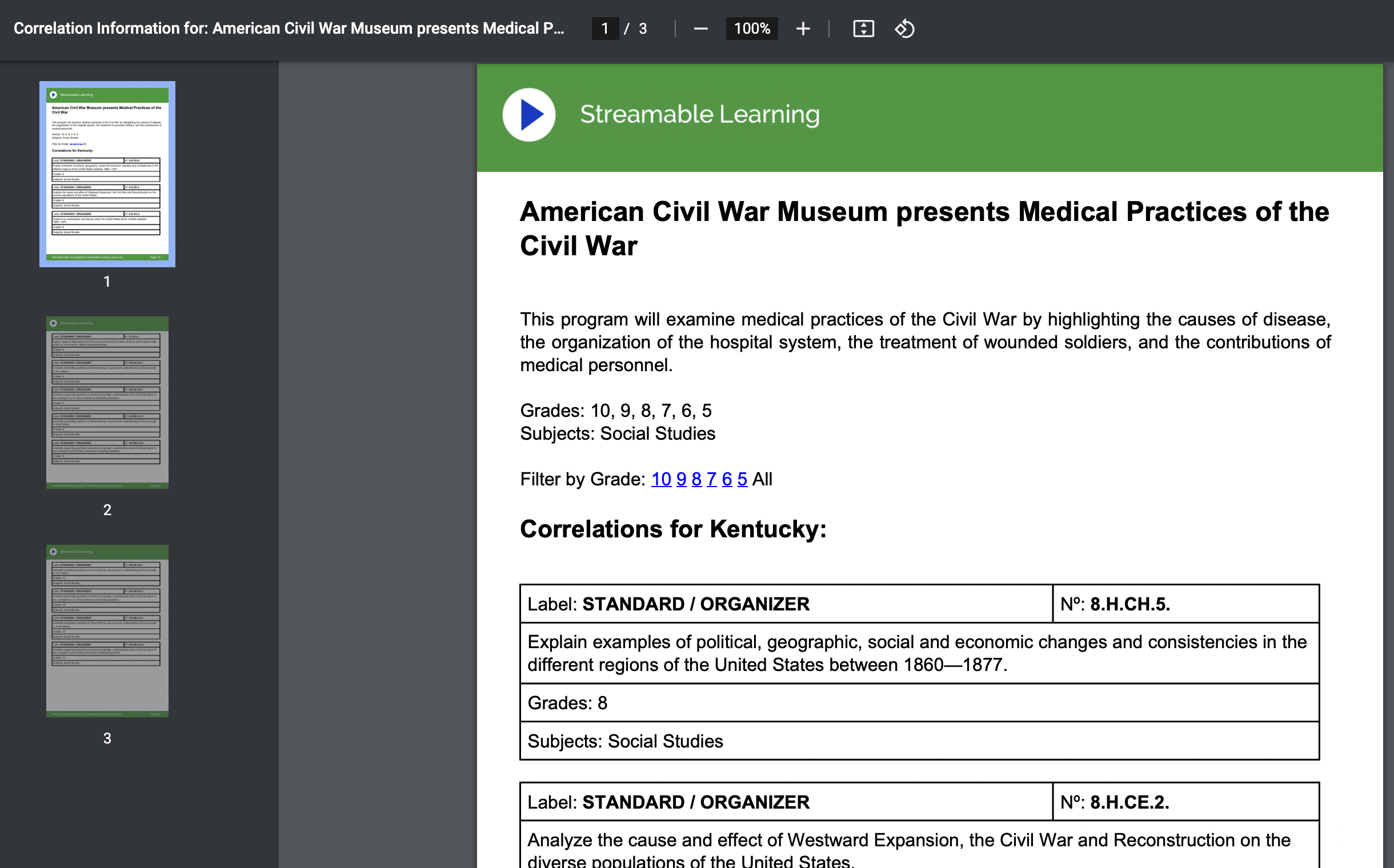
Many of these recordings also have a standards-aligned document to go with them based on a state of your choice. However, once opened, some of these alignment documents say "Coming Soon" or there is no link at all because no standards doc has yet been made available.
The standard alignment document for the above recording.
A final feature worth noting is that a URL to a recording can be shared with a student directly. In order to do so, the student will need your district's "code." (A teacher can look up the code for their district.) Once a student clicks on the link, they will need to type in the district code or they can't watch the recording. Again, Zoom is only necessary to participate in a livestream; no Zoom is required to watch a recording.
Teachers have always loved bringing in a guest speaker, but that might not always be easy or convenient; similar issues with logistics hamper just jumping on a bus with 30 students and going to a museum. (Especially if it's in Alaska or Australia!) Streamable Learning gives a convenient, cost effective, interactive, safe way of bringing outside expertise into your own four walls. Additionally, it's a great way to show authenticity around the content being learned in your classroom, by seeing more vivid examples of its use, impact and application.
Streamable Learning can also address equity issues and give some students virtual opportunities that they may have little to no chance to do in person. An affluent suburban district may have parents that can easily afford supplementing the cost for that annual class trip to Washington, D.C. or Chicago, but for high poverty schools or rural districts already far away from their own local cities, this may not be an option. Streamable Learning can potentially level that playing field.
The ability to potentially share a recorded webinar with students via your district code opens up other options. A student may get pushed a certain video that fits their personalized learning needs and passions. Another may use a recording as a way of vicariously exploring a career path. Or a group of students might benefit from a video to build schema for the focus of their project-based learning.
Downsides?
I wish that search results for recorded webinars were more logically organized, such as the most recent event at top and then going back in time, or perhaps have a few filtering options (alphabetically by partner, for example). Also, it would be helpful if the standard alignment documentation was more consistent. While I understand this may possibly be uploaded sometime after the archived video is put online, several that I randomly found were missing this information even months later.
While the platform costs, the number and variety of content partners and the ability to access previous webinars can make Streamable Learning a valuable instructional resource for students!
Have you used Streamable Learning or another "virtual field trip" platform? Share in the Comments below.
As Shelby County's journey toward competency-based education (CBE) has become regionally and nationally known, educators often ask about resources we have discovered along the way. In particular, what books have we read?
This entry is an attempt to compile a useful -- but by no means exhaustive -- list of CBE related books that I personally feel have been either extremely illuminating in pragmatic ways (detailed models, insightful anecdotes, clear "how to's") or it inspired me to stay the course. Often the same book did both! Instead of ranking them in order of importance, or even in the order I actually read them, I have put them in what I think would be the most useful reading sequence that would best grow one's CBE knowledge as well as help you strategically plan for implementation in your own classroom, school or district.
One very important point here: as with all of my Edtech Elixirs entries and my personal social media posts, this is only Adam Watson's ideal list as of this posting. While my CBE knowledge would not nearly be as robust without my work in Shelby, and although many of these books were part of our leadership reading, this list is not meant to imply any district endorsement of these texts or of the sequence I have described.
Before getting too deep into CBE terminology and logistics, teachers and admin should be given the chance to ideate for an "outside the box" transformative classroom experience. This book's title succinctly states its purpose: we need to dream up a different way of doing school. Dintersmith was the executive producer of the engaging documentary Most Likely to Succeed, which mainly focused on High Tech High in San Diego and how that school challenges how education achievement can be done. This book is basically Dintersmith's road trip covering all 50 states in a single school year as he searches for inspirational models of educational transformation. What School Could Be is both a wakeup call to rally against the status quo as well as a potential map of locations to visit.
2. Reinventing Crediting for Competency-Based Education: the Mastery Transcript Consortium Model and Beyond by Jonathan E. Martin (2010)
Don't let the slim nature of this book (151 pages!) fool you. As Martin describes examples of what a competency-based report card/transcript may look like (in particular, the work of the Mastery Transcript Consortium), you realize how crucial it is to have an effective reporting tool of learning, especially for high school. Beginning your CBE planning with such an end in mind is highly recommended, as we in Shelby can speak from experience that communicating and creating a new reporting tool was an area of challenge in our journey, especially for some of our high school teachers, students and parents.
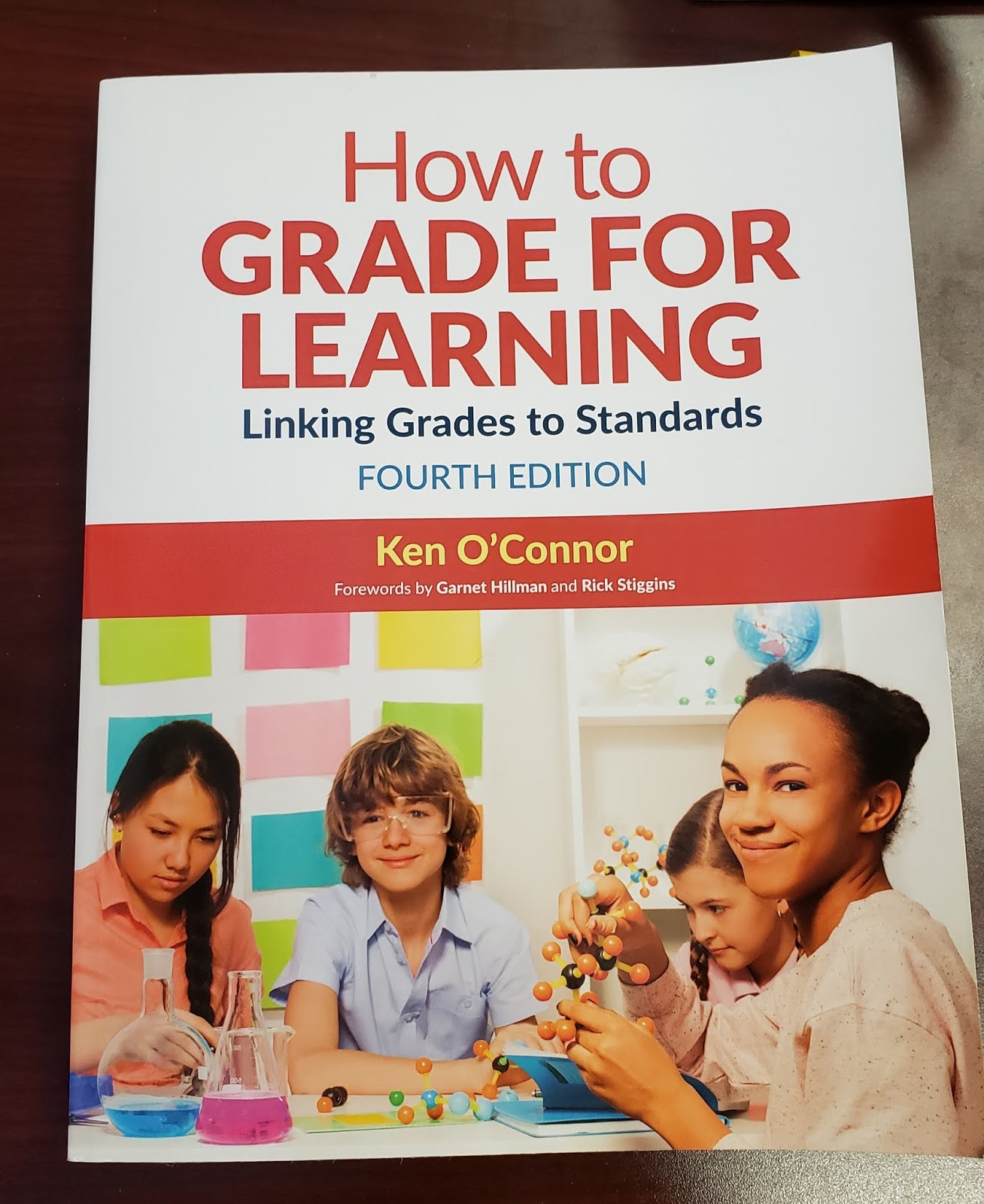
3. How to Grade for Learning: Linking Grades to Standards by Ken O'Connor (4th edition, 2019)
O'Connor has been challenging the idea of what grading should be for many years; in fact, the first edition of How to Grade for Learning came out two decades ago. This book is likely the most "dense" and longest on this list, but it is chock full of very useful examples, anecdotes, and templates. I would argue that the principles laid out in the book are critical for moving to competency-based learning, as you need strong, clear, and consistent standards-based grading (SBG) practices to get there. As I discussed in a previous entry, you need teachers and admin to understand the limits of traditional points / percentage / letter based grading and how SBG is more effective for learning. O'Connor expertly leads you through that shift. I especially appreciate how he devotes whole chapters to looking at how to calculate grades beyond merely averaging numbers (for example, Chapter 5: Emphasizing More Recent Evidence). Make sure classroom teachers have a chance to discuss key excerpts!
4. Transforming Schools Using Project-Based Learning, Performance Assessment, and Common Core Standards by Bob Lenz with Justin Wells and Sally Kingston (2015)
Transforming Schools was one of the earliest books I read on my CBE journey, as I was learning how instructional classroom models like project-based learning fit into a bigger transformative educational system. (This is something not to be glossed over; through communication and strategic planning, your journey to a CBE system should make clear how competency-based learning is not "one more thing on your plate" but instead becomes the plate where personalized learning, PBL, blended learning and other initiatives smoothly "sit" on and build toward.) Lenz and his contributors do an excellent job of sharing their narrative of how they changed learning at one school, which then evolved into a system of transformative schools (Envision Learning). The book also helped me think more deeply about the importance of advisory scheduling, graduate profiles, and students doing defenses of learning. Bonus: it includes a DVD with video clips!
Stack and Vender Els write from the perspective of principals "doing the work" in New Hampshire, a state well known for its CBE leadership. (In fact, Stack is still principal at Sanborn Regional High School.) As the subtitle suggests, it is important to invest wisely and deeply in the professional development of your staff as you shift away from traditional practices, and Stack and Vander Els insightfully outline a successful way to navigate that process. Helpful examples of competency frameworks, as well as how they were created, are shared in detail. I also appreciated the book's discussion of what intervention and enrichment looks like in a CBE system, so students can truly "move when ready." Lastly, both Transforming Schools and Breaking with Tradition explain the need for change in performance assessment practices, and the urgency for creating new performance assessments that better match competency-based learning.
Bonus:Learning Supercharged: Digital Age Strategies and Insights from the Edtech Frontier by Lynne Schrum with Sandi Sumerfield (2018).
I briefly discussed this book in a previous entry. While technically not a "CBE book," I found Learning Supercharged to be highly useful when connecting CBE related pedagogies with best practices in blended learning. Chapters on makerspaces, project-based learning, personalized learning and more allow you to see how crucial digital tools will be when creating an effective "transfer task" culture of mastery learning.
Honorary Mentions of other CBE authors and websites:
Rose Colby.Colby has been talking about CBE for at least a decade and she is often quoted, including in many of the books above. Her 2017 book Competency-Based Education: A New Architecture for K-12 Schooling is a recent example of her work.
Chris Sturgis. Besides writing the forward to Breaking with Tradition, Sturgis is an author of many influential white papers on CBE; she also helped launch CompetencyWorks, itself an important online resource.
Aurora Institute (formerly iNACOL). The site, and its related conferences, continues to be a leader in sharing and discussing the work of CBE and the educators behind it. As a starting point, read its updated definition of CBE published in November 2019.
What are some significant CBE books you have read? Please share in the Comments below!
Full disclosure: Over the last few years, Shelby County has nurtured both one-time consultancies as well as ongoing partnerships with several of the authors and organizations mentioned above.
Welcome back to school! Due to a new K-8 school being built, Shelby County went to a contingency calendar and our first day back for students was today. So most of you have at least a few weeks head start on us.
Since my last entry, Edtech Elixirs has hit a happy birthday milestone. My first entry was August 1, 2014. That makes the blog five years old, with an average of a thousand views per entry (as of today, 141 entries and over 141,000 views)! Not coincidentally -- as the blog began partially as a resource for Shelby educators -- I also had my five year anniversary with the district as well. As always, I thank my blog readers for giving me the audience to share my edtech findings and think-alouds, and I thank Shelby County for allowing me to follow my edtech integration passion.
And now onto today's topic focus . . .
Back in June, I attended the third annual Deeper Learning Symposium hosted by Jefferson County Public Schools. One of the presenters was Danna Pearsall, who shared her knowledge on Nearpod. I learned about a few new features, including the ability for students to take (and then download) notes while participating in a Nearpod Presentation. These notes -- complete with the slides themselves --- can even be added to their own Google Drive! (It should be noted that the notes feature is only available if the presenter gets the paid version of Nearpod. More on that in a bit.)
An example page from downloaded student notes. This is a premium "Gold" (i.e. paid) feature of Nearpod and needs to be enabled by the teacher.
Before I go any further, I should mention that Nearpod itself feels like an old friend that I actually first tried out back in my classroom teaching days. When I came to Shelby, it was one of the earliest edtech tools I recommended to staff, and I wrote about our teachers using it in the first year of Edtech Elixirs. As much as I admired Nearpod in the past, I continue to be impressed as it grows, thrives and improves in 2019 and beyond.
What is Nearpod? Put simply, it is a teacher-paced, guided presentation tool with interactive elements that can help you assess your students in real time, as well as give you data reports to analyze later. Although you can create a presentation from scratch inside Nearpod, most will prefer importing a finished one into the platform, and that is where I want to make a tangent before discussing more about the tool itself. The real power of a tool like Nearpod is that it is a schema scaffold for tech-hesitant teachers to expand their edtech integration ability into the classroom.
How do we reflect on the deepness and richness of edtech implementation? Consider SAMR as a way of analyzing the net effect (pun intended!) of when technology is integrated into a classroom lesson:
Substitution is where new tech replaces old digital/analog tools, but the task is unchanged.
Augmentation is the same task, but there is more functionality and improvement of effectiveness because of the technology.
In Modification, you have redesigned parts of the task, and begin to see the transformative nature of the technology use.
Redefinition is the ultimate transformative experience that usually reaches an audience or collaborators outside of the four walls of the classroom. Here, we design and create tasks previously inconceivable thanks to the technology.
One of the things I love about SAMR as a reflective tool is that the focus is on the task, not the technology. There are no points earned in SAMR for mere edtech usage; it is all about integration and intentionality. As an example of this, consider Skype. When it first became a mainstream tool, it seemed like something out of a sci-fi show. (On a screen or flat panel, Skype stillreminds me of the Star Trek viewscreen on the bridge of the Enterprise.) .However, if you got a person to Skype into your classroom and just ends up a talking head that is remotely piloting a PowerPoint, how transformative is that compared to a guest speaker coming in person and droning on for an hour? You are, from a learning perspective, breaking even at best. If it is a non-interactive lecture, one would be better off with the guest shooting a video, burning it on a DVD, and mailing you the disc. (At least you could pause a DVD!) As you can see, it is not Skype itself, but the use of Skype that has to be analyzed via the SAMR lens. So it is with any technology you bring into the classroom: you need to first consider your task at hand and the academic objectives you want to meet.
The act of going from S/A to M/R means going from tech enhancement to tech transformation of what a learning experience can be, as well as going from a teacher-centered to a student-centered environment. Who is making the tech choices? Are students creating or consuming? Put another way, if the electricity and Internet go out, a S/A lesson can theoretically be improvised and continue ("I'll guess I'll lecture without pictures," or "I'll hand out a multiple choice quiz on paper instead") whereas a M/R lesson would be dead in the water.
Understanding SAMR is all well and good, and most teachers can make a Substitution move fairly easily, such as going from an overhead projector to a PowerPoint. The struggle is finding a pragmatic way to get to "AMR" edtech integrations. Here it is a question both of appropriate tools that stretch without overwhelming the educator, as well as finding a judgment-free way for the educator to grow their pedagogy. While Substitution often (but not always!) is typical of a traditional pedagogical environment (i.e. direct instruction, lecture-minded, teacher-centered), it is unrealistic to assume an experienced teacher can or even should jettison all of their former skills and tools to move into a transformative pedagogy. Indeed, there are times that Substitution (or no tech at all!) might be best, or traditional lectures and direct instruction may be necessary to properly meet the specific and contextual academic objectives at hand. The only concern is being stuck in an instructional rut of always doing Substitution/traditional approaches when other ways might be more effective or impactful on learning.
And that is why a tool like Nearpod can be a powerful tool, especially for teachers just learning to grow their edtech practice. Nearpod's original genius was its assumption that many teachers already have a storehouse of instructional material -- PowerPoints. Nearpod makes it easy to import these pre-existing PowerPoints into Nearpod Presentations. All that's left is adding interactive elements such as polls, open ended questions, "draw it" features, and quizzes. When a teacher is ready, he/she turns the Nearpod Presentation into a live session. A nice bonus: since the session will be pushed to the students' screens, you don't need a main projector or display. A student doesn't need to create an account; the teacher's live session generates a unique code only good for the current event, and a student easily joins the session with that code and signs in by providing their name. (While there are apps for Nearpod that makes it somewhat easier to join a session from a mobile device, any device with a browser and Internet access will do.) The pacing -- that is, when the slides advance -- is completely in control of the teacher. When interactive elements occur, teachers can see the data in real time, and even share a student answer anonymously to all the screens for the sake of discussion or highlighting a good model example. At the end of the live session, a final report is generated for the teacher where you can review the data/answers from all the interactive elements as a PDF. Thus, Nearpod's potential for Augmentation and beyond can be plainly seen. Students are interacting with the teacher, content and each other in new ways; a teacher can use the assessment data to impact and change instruction in real time as well as for future planning; a student can think and reflect more deeply via the interactive assessments than a Scantron bubble test could ever reveal. And imagine if, instead of Slides and PowerPoints, students created Nearpods to lead interactive presentations, or to gather data from a user group as part of a Design Thinking invention process! In short, Nearpod allows for genuine blended learning.
Here is a video which demonstrates how Nearpod led an instructor from his former mode of PowerPoint presentations and pushed him forward to a transformative classroom (1:13):
It should be noted that while the features mentioned above can all be done with the free Nearpod version, paid versions exist (currently $120 and up annually for an individual license) that give additional tools. The licensing is based on a teacher, or "creator" account -- a student participating in Nearpods never has to pay or even make an account. Additional features for the paid version include some additional interactive/inserted material elements (such as inserting YouTube videos), increased online storage space for your Nearpod Presentations (from 100 MB to 1 GB and up**), enabling the student notes feature mentioned earlier, and perhaps most importantly, the ability for students to do a Nearpod Presentation "anytime, anywhere" (perhaps personalized to student needs!) instead of only when a teacher makes a live session.
If you are interested in pre-made Nearpod Presentations, there is an online store. Thanks to a multitude of partnerships with companies such as Common Sense Media, Teaching Tolerance, CK-12, PhET, Newsela, and BBC Worldwide, the catalog is deep, with high quality lessons across a wide gamut of content and grade levels. However, while some of these are free, many of them cost from a few dollars for a single lesson up to approximately $30 for a bundle.
Other features of Nearpod that have been added in the last few years include:
Google Slides Add-On. There already was a free Chrome Extension (Nearpodize) that could take your Google Slides and convert them into a Nearpod Presentation. However, you can now easily insert interactive material while creating your Slides, then upload it all to Nearpod. From the Slides menu, choose Add-Ons > Get add-ons and search for Nearpod. Read here for more details.
Nearpod 3D. You have a gallery of over 100 three dimensional, manipulatable objects to insert into your presentation. Students can rotate them and zoom in and out. The gallery categories are Ancient Times, Amazing Places and Things, Environment, Human Body, and Microscopic. Read here to find out more.
Nearpod VR. Imagine taking your students on a virtual field trip and seeing a place in a 360 degree environment. Nearpod has an extensive amount of VR Presentations in their store -- some free, some not. Two things are outstanding about Nearpod VR. Firstly, there are incredible choices across multiple contents -- even ELA and math! (Recently, lessons were added that incorporate Historical Perspectives and Literacy, which fits nicely with new social studies standards.) Secondly, Nearpod VR works fine on any device, including Chromebooks. While phones in goggle headsets may make VR more immersive, Nearpod VR requires no special equipment or setup. For more details, read here.
The Nearpod Google Slides Add On allows you to insert activities while composing your Slides, which then can easily be uploaded / converted to a Nearpod Presentation. Note that some of these activity options only work with the paid version.
If there was a downside to Nearpod, it is definitely the price point for the premium features. While I appreciate what you get for free, and that the paid licenses have likely enabled Nearpod to endure and improve for all these years, I just wish there was a tier between free and $120+. Perhaps a middle option of $20-30 a year to allow student to take notes and teachers to give students Nearpod Presentations that are personalized "anytime / anywhere" lessons/homework?
Nearpod starts with existing edtech schema and pedagogy (PowerPoints, direct instruction, lecture) and builds upon it to create a deeper learning experience. I could mention other edtech examples that do the same, such as Google Docs, which takes what teachers and students already know about word processor programs and has the potential to improve the task of writing itself (i.e., Google Docs allows students to have real-time collaboration and use Comments for more effective peer feedback). The point here is that tools like Nearpod and Google Docs stand on the threshold between traditional and transformational pedagogy. These tools are part of a much needed bridge of a larger transitional pedagogical framework, necessary for improving not just edtech integration, but the nature of teaching and learning itself.
**Update: the storage size is updated, as of 8/14/20. As with all edtech, other elements of Nearpod described in this entry may also change over time.