Thursday, July 7, 2022

ISTE 2022

 My first trip to an ISTE (International Society for Technology in Education) conference was to San Diego a decade ago.   I was still a classroom teacher at the time, hungry for digital tools and strategies; to put the trip in historical edtech context, iPads were only two years old when I went to that first ISTE!  Unfortunately, I haven’t been to an ISTE conference since then…so I was extremely grateful for the opportunity to go (along with some SCPS teachers, and 14,000 others!) to this year’s ISTE conference in New Orleans.  It did not disappoint!  


Briefly, here are some of my personal highlights.

EEEASE into an “Explore Board”

Holly Clark may promise a lot with a session name like “The Perfect Blended Lesson,” but if anyone can come close to that ideal, it’s likely her.  One aspect I found particularly illuminating was her distinction between a “Choice Board” and what she felt was a better branded “Explore Board.”  An Explore Board is a hyperdoc carefully constructed with a pedagogical purpose, infusing digital tools; a Choice Board is often only a “tic tac toe”-style worksheet that asks the student to complete tasks that are digital or analog.  (The presentation Slides linked above have some templates and examples of Explore Boards.)

After the session, I reflected on Clark’s defined features of an Explore Board along with what I already knew about effective digital pedagogy.  I then made an acronym (because we all agree that education needs another one!):  EEEASE.  While this list of key characteristics certainly can specifically apply to essential aspects of an Explore Board, they could also apply to a well made blended learning lesson in general:

  • Engage the audience (the “hook”).
  • The students should Explore the topic to build schema, within a digital resource framework of “bumper rails” provided by the teacher. 
  • Explain what you want the students to do: the directions and step-by-step of the task(s), the desired outcomes, and possibly a rubric.
  • Students should Apply what they have learned or what they can do.  Optimally, the type of final product that demonstrates the learning is the choice of the student.
  • Students should digitally Share or publish their work (outside of the classroom when possible) or reflect/self-assess on what they have done; ideally, they will do both!
  • Offer a way to meaningfully Extend the learning for those that need more help or complete the work early.


STLP Gets a Shoutout! 

On the second day’s opening session, a panel of students shared their insights….and Luke from Trimble County was one of them!   He particularly praised Kentucky’s STLP Program as a crucial learning opportunity that he personally enjoyed and benefited from.  


LeVar Burton

Whether you know him from Roots or Star Trek: The Next Generation or Reading Rainbow, LeVar Burton has been at the forefront of culture and education for decades.  Recently, he’s joined forces with BYJU'S (the parent company of Osmo) as their new Chief Reading Officer in order to create a new literacy app that’s about to launch, so ISTE became an opportunity to talk edtech and his life journey in an hour-long interview conducted by Donnie Piercey.   To sit in the front row of Burton’s talk will be a wonderful lifelong memory for me.


Learning and Practicing SEL in Virtual Reality

I found out about Project VOISS, a combination VR platform and lesson resource site where students can interact in a virtual school, practicing their choice of responses in various social emotional learning scenarios and seeing the consequences of those choices.  I’ve been intrigued by virtual reality learning for years, but admittedly the hardware requirements can sometimes be limiting (for example, the need for headsets); I was impressed that VOISS will work on Chromebooks.  They are currently seeking district and school partners to expand its platform usage. 

New Book

As a fan of PBL, I was excited to pick up a copy of Suzie Boss and Jane Krauss’s Reinventing Project-Based Learning (Third Edition) at ISTE’s onsite conference store.  It already looks promising to provide some insights for my district leadership in the coming school year.


Thank you to ISTE for facilitating such an inspiring and learning-packed conference!


Sunday, July 3, 2022

Torches in the Night

On July 3, 2022, I led a service at All Peoples, my Unitarian Universalist church in Louisville.   Based on the date, I had to negotiate riding the fence of a sermon that was both timeless and timely -- recognizing eternal values while also addressing the week that was.  

And it's been a tumultuous couple of weeks in America.

While I usually keep within the educational lanes for Edtech Elixirs, I do occasionally stretch the focus when I feel particularly passionate about circumstances, and this is one of those times.  I was very flattered that my sermon, titled "Torches in the Night," were well received to those attending in person and on Zoom, and several people asked for a copy of my text, so I thought it best to share it here. If it provides any comfort or insight to others, I'm grateful.

Wednesday, April 20, 2022

Article in EDspaces Essentials magazine!

Flashback time! In November 2021, I presented at EdSpaces21 in Pittsburgh, PA on the challenges, joys and lessons learned from opening Marnel C. Moorman (MCM), our newest K-8 school in Shelby County which opened in December 2019.  It was not only my first time presenting at EDspaces, but my first time presenting in person outside of my district in well over a year! EDspaces's media person was kind enough to take and share some professional pictures of my session:


Now, back to the present.  EDspaces's Essentials online magazine reached out to me and asked if I wanted to write an article based on my Pittsburgh presentation.  I did, they accepted, and my article "A New School is a Narrative: How the Story of Your Building is Written and Revised" is now online!   I'm thankful for the opportunity to be published and to once again share the story of MCM.

In closing, if you're considering a renovation/new construction of a school and want to hear from educators and architects who have been through the process, or are looking for vendors to support the purchase of furnishings for a new flexible learning space, I highly recommend planning a trip to an EDSpaces conference.

(Full disclosure: As a first time visitor and presenter to their conference, I applied for, and was grateful to receive, a "scholarship" from EDspaces to offset the cost of my registration and hotel.)


Saturday, April 2, 2022

Verso

At the beginning of March, I had the fortunate opportunity to attend and present at the KySTE conference in Louisville -- the first time the conference was back in person since the pandemic started.  (I was literally at KySTE in 2020 when the world shut down, a story I shared here.)  As if fate wanted to re-affirm for me the value of KySTE, I learned of a new tool in the very first hour of the very first session of the conference that got me so excited, I knew I'd be doing a blog entry about it!  The presenter was Roslyn Manning -- more with her in a moment! --- and the tool was Verso.

Verso is a platform for virtually managing discourse in your classroom.   At its most basic, a teacher can create a question or pose an issue, and students can not only respond to the prompt, but to each other.  But Verso has an extensive set of tools that make it much more than just a place for an online conversation thread.

How does it work?

Firstly, you need to create a teacher or student account, either via email or through Google or Microsoft.  (I would recommend students use Google, to minimize remembering yet another username/password as well as to expedite Google integration.)

When a teacher first creates an account, Verso helps walk you through the creation of your first Class; you can create as many Classes as you like.  Each Class has a unique code that can be given to students, making it easy for them to join.  Once a Class is made, you have two basic kinds of discussions you can push to students: an Activity, or a Check-In With Students.

An Activity is the much more robust and customizable option.  You can attach files, links (to websites but also to videos), or something from your Google Drive to build schema before they address the prompt.  Next, you provide instructions in a Rich Text Format editor box.   You can give conversation starters, as well as suggest contextual and academic vocabulary to use.  There are several toggle settings where you can allow students to provide video or audio responses, upload files or images, or even limit them to 500 characters or less.  Lastly, you can indicate a specific start and end date for the Activity, turn on moderation if you want to approve responses before they appear, and determine whether students can comment on each other's responses.   After an Activity is launched, you have some other editing options, such as hiding student names from each other for anonymous responses and comments (although the teacher can still see who said what).


There are several features here worth mentioning that elevate these Activities.  Firstly, while you may not want or need to include every single aspect for every discussion, the formatting suggestions Verso provides is excellent scaffolding to ensure students engage in high quality discourse.    For example, your directions can provide sentence stems to model what a response or comment should sound like, and vocabulary suggestions are a reminder of both academic jargon that is appropriate to the content topic as well as discussion phrases that strengthen argumentation.   This leads us to a second useful feature: from the teacher's dashboard, you can even view responses that highlight when this vocabulary is used!

Check-In With Students is the other task option, which is much more template driven.  Its purpose is not so much open ended discourse as to have students reflect on their recent learning and/or how they are feeling.  While a Check-In may be limited in its customizations, the advantage here is that it can be quickly pushed out -- perhaps as an exit ticket at the close of a lesson, or a social-emotional learning (SEL) pulse check at the start of the day. 


Creating a Check-In can be done in just a few steps.  Note the potential categories in Step 2 which help shape the objective.


Once student responses come in from a Check-In, it's easy to see what category the students have self-assessed themselves so you can plan your next lesson accordingly.


How could you use it?

Verso clearly can make student online discussions more engaging and rigorous, as well as make SEL and learning reflections easy to push out and analyze.   Don't forget to utilize audio and/or video responses to increase equity for EL and ECE students; that way, the focus is on the quality of their responses' content as opposed to the medium of the reply.

Here's an excellent Activity tip from Roslyn: if you want students to comment on each other's responses, turn on moderation.  Once all students have responded, turn off moderation and "publish" all the responses, then remind students to now comment.   This will give all students the best chance to receive comments since all the responses are available at once.  (Without such management, the late responders will be the least likely to receive a comment.)  

Downsides?

With the free version, you are limited to only three active Activities (and can't edit them once created and saved) unless you pay for the premium version; as of the publication of this entry, this upgrade costs $59 a year.  It would be nice to see integrations such as Google Classroom which could pre-load a Class's roster.


As I explored Verso, I was definitely curious to hear more about how it's being used in the classroom, so reaching out to Mrs. Manning seemed a natural next step.  I've gotten to know Roslyn a bit through our Kentucky Digital Learning Coach state network, and I share her passion for student discourse.   So I was thankful she accepted my invitation to be interviewed for Edtech Elixirs!

Roslyn, welcome to Edtech Elixirs!  Share with us your educator story.  

​Thank you so much for having me! I come from a long line of educators--my grandmother was an elementary teacher in Alabama, and my mom was an ECS teacher in North Carolina where I grew up. She taught in a variety of different types of schools, but for most of her career she taught in the state juvenile prison system. Talk about an interesting childhood--I grew up roaming around the local prison! I knew that I would eventually become a teacher. I think it's a part of my DNA. I've always loved reading and writing, so I decided that I wanted to be an English teacher. I attended the University of Alabama (Roll Tide!) and graduated with a B.S. in Secondary Education Language Arts. I taught Advanced Junior English in Tuscaloosa right after graduating, and at the end of that school year, I moved to Kentucky to be closer to my now-husband. In 2013, I started teaching freshman and sophomore English at Oldham County High School while completing KTIP and getting my Master's in Teacher Leadership, focusing on Instructional Technology. In addition to growing in my technology use, I also worked to earn my National Board Certification. I often participated in school and district technology initiatives--Digital Leader Network, iTeam, etc., and in May 2020, I became our district's second Digital Learning Coach. 


Why do you feel that student discourse in general – especially peer to peer – is important?

​It's no secret these days that students struggle with communication. This is a skill that ALL people learn eventually, but I think the increase in technology has the general population complaining that "kids these days" only know how to communicate in text messages. As an educator, I think it's vital that we meet students where they are, and change our instruction to better prepare our students for the digital world that they communicate in. The variety of ways students can communicate just elevates the need to teach peer-to-peer communication more intentionally in MULTIPLE ways: verbally and digitally. 


What does digital discourse achieve differently, or perhaps even sometimes better, than face-to-face discussions?

​Digital discourse, in my experience, is a gateway to deeper face-to-face discussions. So many of our students need time to process their thoughts before sharing with an audience, whether that be a digital audience or an in-person audience. And, as I mentioned previously, students are communicating in writing much more frequently than they are verbally in person or over the phone, so why would we not intentionally give them learning opportunities to practice, make mistakes, and grow in this area? I wouldn't say digital discourse is inherently better than face-to-face discussions, but in the same way that we teach our children dinner table etiquette, we also have a shared responsibility to teach our students digital citizenship through netiquette. 

As an English teacher, I used to emphasize "code switching" with my students. I never wanted to shame them into thinking that their colloquial language  is "bad" or "wrong," but I did want them to learn the appropriate settings for the language that they choose to use. The same holds true for digital discourse, and there's a lot to be learned from digital communication. Students have to analyze tone and word choice to be effective communicators through writing. For most, verbal communication is much easier to deliver and decipher because of verbal and nonverbal cues, but written communication requires far more refined skills. It's important to provide a safe space for students to practice and refine these skills.   [Editor's Note: for more on the value of digital discourse, read this previous blog entry.]


I’m highlighting Verso in Edtech Elixirs, a tool I’m pretty excited to share!  Can you share any stories of how you or other Oldham teachers have used Verso effectively?

​A good friend of mine at Oldham County High School introduced me to Verso several years ago. She will tell anyone who asks that she's not "techy," but she discovered this tool when it was in Beta and started using it with her A.P. English Literature course. I quickly jumped on board and used it to set up a Socratic Seminar with my English II course. My students struggled with verbal discussion, especially if it was whole-class, so this was an easy way to get students talking to each other anonymously and to provide tons of support for them in the way of sentence stems and stimulus material for discussion. There are so many features available to teachers that we can use to help support our students' discussions, such as the ability to comment and "star" student feedback and even hide responses if they're inappropriate or irrelevant. 

Verso  is an excellent tool to give peer feedback on their work as well. I love the collaboration that comes from using Verso in so many different ways! 


Any other digital discourse tools that you’re a fan of?  

​There are so many ways for students to engage in digital discourse such as Padlet, Google Workspace tools, and more. However, I love using Parlay Ideas as well. Be aware that it is a freemium, so you don't get unlimited Roundtables. It's very similar to Verso in that you can have students communicate anonymously with their peers, but Parlay also has a "live Roundtable" option that helps you facilitate live discussions (similar to Socratic Seminars) where students can "tap in" to the conversation and teachers can "nudge" students to share their ideas with the class. 


Roslyn, thank you so much for agreeing to our interview today!  One final question: what’s your advice to teachers just starting to integrate technology into their classroom?

​Always be transparent with your students! As a young teacher, I thought I needed to "know it all" and felt embarrassed if I didn't know an answer or made a mistake. However, students appreciate hearing, "I've never used this before. If it totally flops, we'll figure it out." I experienced MUCH more success with technology when I was totally honest with my kids about the tools we were using. And most of the time, they were much more patient in the process if they knew we were all learning together!


What are your thoughts on Verso?  Have another favorite digital discourse tool?  Share in the Comments below!

Update 3/18/24:  With the free version of Verso, you now are limited to only three active Activities and cannot edit them once created and saved.  I'm not sure if you can delete one of these three Activities in order to "free" a slot, OR if the first three you create are free and you are then forced to upgrade the account (and deleting one wouldn't help).  I've updated the entry to reflect this change. 


Tuesday, March 15, 2022

Vodcast Series Highlighted in Next Generation Learning Challenges Report!

Education during COVID-19 -- and COVID's lingering impact on learning post-pandemic -- will likely be researched and studied for years to come.  One such study was conducted recently by Next Generation Learning Challenges, which surveyed 70 schools and districts in 2020 and 2021 who, despite genuine challenges, were having some successes.  The key question was: how and why were these schools and districts succeeding despite distance learning issues and other pandemic obstacles?  This is reflected in the final report's title, "What Made Them So Prepared?"

The full report was released today and it's a fascinating study.  From NGLC's press release, I'll quote three big themes that emerged from their findings:

  • The common-sense assertion: To help students become capable, caring, self-directed learners and creative problem-solvers, our schools should model those same attributes for them – in their design of learning, but also in our adult working culture and operating habits. 
  • The research finding: Schools and districts that had made this commitment pre-COVID strongly benefited from it during the pandemic, enabling our communities (including students) to respond adaptively and creatively. Agentic learning and operating approaches, efforts to create a healthy culture supported by strong relationships, and resilient, flexible systems made districts feel prepared to face the pandemic’s many challenges.
  • The value to ALL schools and districts: Ed leaders seeking positive ways to move past Omicron and rebuild forward momentum can use this project’s findings and resources to build on their own school or district’s examples of resilient, adaptive innovation during the pandemic. This research offers a productive way forward at a time of urgent need.


One of these 70 schools and districts that NGLC picked to interview was Shelby County Public Schools, and we are highlighted in their report!  SCPS is mentioned briefly on page 9 (PDF page 5) as one of several districts that have a Profile of a Graduate, but more prominently, we are featured on page 7 (PDF page 4) for our two "Shelby Speaks" vodcast series that we uploaded to our YouTube channel in May 2020 and January 2021.  I was proud to co-create and facilitate these interviews with our fantastic SCPS educators from many different role groups -- general education, ECE, English Language, librarians and more -- who shared their reflections on tips, tricks, strategies, successes and challenges of distance and hybrid learning.  (For more on these vodcasts, please read my blog entries here and here.)

We are thankful to NGLC for the chance to contribute to such a historical project, and I encourage you to read their full report.


Saturday, March 5, 2022

Share Fair 2022

 After a year off because of COVID-19, Share Fair came back!

Last weekend, we held Share Fair 2022 and had several firsts, which included ending with a "campfire reflection" (attendees sharing takeaways and gratitudes for what they experienced that day) and door prizes donated by DreamBox Learning and Sixth and Main Coffeehouse.  But the most important "first" was a keynote presentation panel of Shelby County students that I moderated around the theme of "My Shelby County Personalized Learning Story."  I really have to thank Kerrigan Aldridge, Bryce Applegate, and Regan Ross for their poise, insights, and demonstrating such effective communication!

Last but not least, thanks to all who attended or presented on a Saturday morning.  If the comments during the campfire reflection was any indication, the Share Fair was worthwhile.

As I've done previously, I've documented the event via Wakelet, linked directly here as well as embedded below.


Tuesday, February 22, 2022

Edtech and preK-8 Literacy: A Template to Help with Deeper, Intentional Integration

If you are an educator who is wrestling with improving preK-8 student literacy, you likely are already very familiar with Irene C. Fountas and Gay Su Pinnell.  As their Twitter profile summarizes, they are "authors of books, videos, & websites that are considered standards in the fields of literacy and professional development."  Besides a very helpful website full of resources, they have also created a preK-8 Literacy Continuum published in a popular book, most recently given an expanded edition in 2016.

As a former high school English teacher with limited foundational elementary reading and writing instructional expertise, I have to admit that I did not have a deep knowledge of Fountas and Pinnell until Jill Brookman, our district Literacy Coach, met with me to discuss their Literacy Continuum book -- in particular, an intriguing part of the book that details their "Technological Communication Continuum."  (The entire book and its extensive Literacy Continuum has proven very effective in helping Ms. Brookman coach our teachers in improving their instructional pedagogy.) As the authors explain, the literacy of learners today is much more expansive than just engaging in printed text.  Students must also demonstrate their computer literacy (the use of various devices to "create documents, find information, and communicate with others"), online reading and information literacy (comprehending, as well as critically evaluating, such text), and composing and publishing digital texts (which in a multimedia world is much more complex than simply typing a story in a word processing program!) (pp. 346-347).   With such digital communication in mind, Fountas and Pinnell put their preK-8 Technological Communication in a continuum as a progressive set of standards, or in their parlance, "goals" to select.  These student "behaviors and understandings to notice, teach and support" are organized into two categories for each grade level: Digital and Media Literacy (reading, or the consuming of electronic text) and Communication and Publishing (writing, or the creation of electronic text) (pp. 348-356).

Ms. Brookman knows I am constantly looking for ways to more authentically connect learning objectives to technology integration.  (A recent example: how I crosswalked edtech with competency-based design principles, as featured in Eliot Levine's July 2021 CompetencyWorks blog entry.)   So she posed a challenge.  Using the Technological Communication Continuum standards, could I describe how a specific edtech tool could exemplify high rigor literacy?  Would these standards help me articulate how you can integrate edtech with greater intentionality in a teacher's lessons plans to invoke deeper student learning?

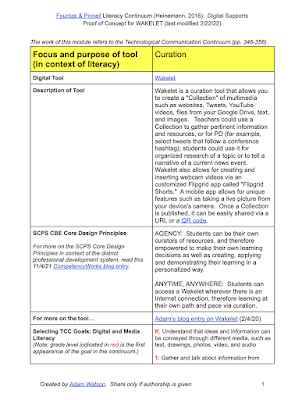
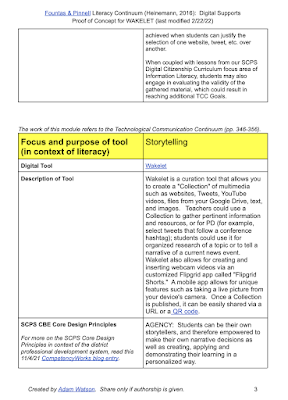
Challenge accepted!  As a proof of concept, I used Wakelet (a wonderful tool I previously discussed here) as my prototype modules; Wakelet is a natural fit for curating resources (reading) as well as storytelling (writing).  These two modules were organized around a template I created with several sections, such as:

  • Description of Tool.  Explaining briefly what the edtech tool is, and how it works.
  • SCPS CBE Core Design Principles.  How does the tool align with our district's competency-based education beliefs what is best for learners, such as supporting student "Agency" or "Anytime, Anywhere" learning?  (These Principles were adapted from Aurora Institute's updated 2019 definition of CBE, explained here.)
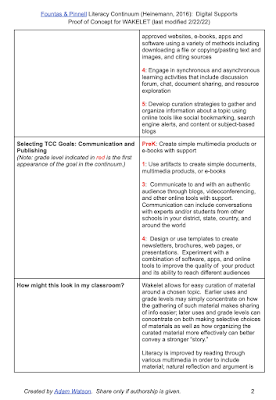
  • Selecting TCC [Technological Communication Continuum] Goals: Digital and Media Literacy.  What reading or media consumption Continuum goals does the tool best achieve?  The grade level where the goal is first stated in the continuum is highlighted.
  •  Selecting TCC [Technological Communication Continuum] Goals: Communication and Publishing.  What writing or media creation Continuum goals does the tool best achieve?  Again, the grade level where the goal is first stated in the continuum is highlighted.
  • How might this look in my classroom?  Further detailed explanations and concrete examples of how the intentional usage of the edtech tool helps further literacy. 

Both modules for Wakelet are together and viewable in the PDF linked here. You can also see screenshots of the first three pages of the document below, with the focus on using Wakelet for curation:


Besides Wakelet, there are certainly other worthy edtech tools that can go hand in hand with exemplifying these Fountas and Pinnell Technological Communication Continuum literacy standards.  I encourage others to use the template above to do so, and articulate their own deeper, richer synthesis of intentional edtech with more effective literacy instruction.  And I thank Jill Brookman for introducing me to the highly illuminating Literacy Continuum book!